

Most "free AI for marketing" guides quietly assume a paid plan.
This one does not. Google AI Studio is free. You sign in with a Google account and start building.
Quick note on the name. There is no Gemini 4 yet. As of June 2026, the newest model is Gemini 3.5 Flash. We will use the real current models here, not a version that does not exist.
This guide is hands-on. You will get a free API key, build a reusable prompt, and run three real marketing jobs. Ad copy. Content briefs. Keyword clusters. Let's go.
Quick Facts: Google AI Studio and Gemini at a Glance
- Google AI Studio is free and needs no credit card to start — (Source: DataStudios, 2026 — datastudios.org).
- Gemini 3.5 Flash has been generally available since May 19, 2026 — (Source: Google, 2026 — ai.google.dev).
- Gemini 3 ships a 1 million-token context window across text, image, video, and audio — (Source: Google, 2025 — blog.google).
- Nearly 87% of marketers use generative AI in at least one recurring workflow in early 2026 — (Source: HubSpot, 2026 — hubspot.com).
What Google AI Studio Actually Is
Google AI Studio is a free web tool for building with Gemini.
You open it at aistudio.google.com. You sign in. That is the whole setup.
Inside, you write prompts and test them against Gemini models. No code is required to start. You see the response right there in the browser.
It is free at this layer. The tool itself charges nothing, and no payment method is needed for basic use (Source: DataStudios, 2026 — datastudios.org).
A few things make it useful for marketers. You can set a system instruction. You can adjust temperature, top-K, and top-P. You can force structured output like JSON.
That last part matters. Structured output turns a chat box into a small tool.
You can also export your prompt as code. One click gives you a ready snippet with the API call and a key placeholder. That bridges play and production.
Q: Is Google AI Studio the same as the Gemini app?
A: No. The Gemini app is a consumer chatbot. Google AI Studio is a builder's workspace with system instructions, model settings, structured output, and API export. Marketers get far more control here.
Which Gemini Model You Get in 2026
Let's clear up the model names.
The title says Gemini 4. That model does not exist yet. The real current lineup is what you should know.

As of June 2026, Gemini 3.5 Flash is the newest model. It has been generally available since May 19, 2026 (Source: Google, 2026 — ai.google.dev). It now sits behind the gemini-flash-latest alias.
Gemini 3 Pro is also available. It launched on November 18, 2025 (Source: Google, 2025 — blog.google). Gemini 3.5 Pro is rolling out during June 2026.
Why this helps marketing work. Gemini 3 is fully multimodal across text, images, video, audio, and code. It carries a 1 million-token context window (Source: Google, 2025 — blog.google).
That context size is the unlock. You can paste a full content calendar or a long brief. Gemini reasons over all of it at once.
Q: Which Gemini model should I pick for marketing?
A: Start with Gemini 3.5 Flash for speed and cost on daily tasks. Use a Pro model when the job needs deeper reasoning, like strategy or long-document analysis. Both run inside Google AI Studio.
Step 1: Get Your Free Gemini API Key
You do not need a key to test prompts in the browser. You need one to wire Gemini into tools.
Here is the path. It takes about two minutes.
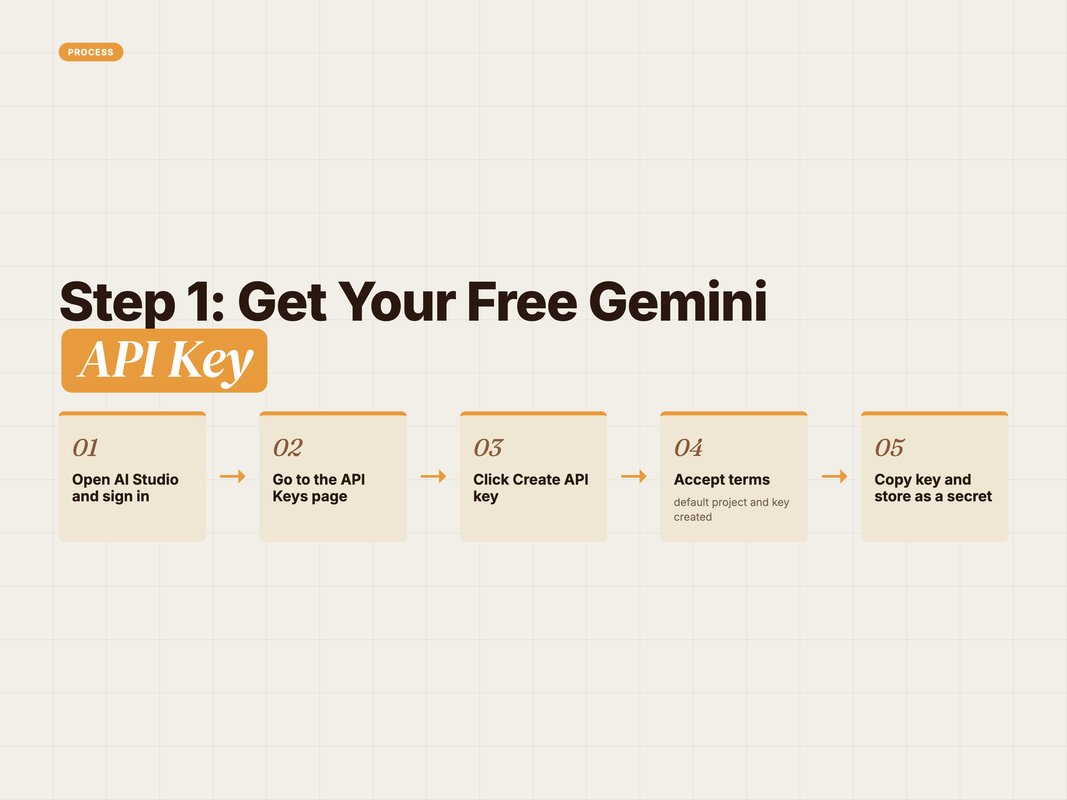
- Open Google AI Studio at aistudio.google.com and sign in.
- Go to the API Keys page from the left menu.
- Click Create API key.
- New users get a default Google Cloud project and key after accepting the terms (Source: Google, 2026 — ai.google.dev).
- Copy the key and store it as a secret, never in client-side code.
No billing is required to begin on the free tier. You can start making real requests right away (Source: Google, 2026 — ai.google.dev).
One safety rule. Treat the key like a password. Keep it in an environment variable or a secrets manager, not in a public repo.
Q: Do I need a credit card for the free Gemini API key?
A: No. Google AI Studio creates a free key without billing for basic use. Billing only starts if you enable it in Google Cloud or push to higher usage tiers. For drafting and small tools, the free tier is enough.
Step 2: Use Gemini for Ad Copy
Now the fun part. Let's run real marketing jobs.
Start in AI Studio. Set a system instruction first. It anchors tone and format every time.
Paste this as your system instruction:
You are a direct-response copywriter. Write short, concrete lines. No hype words. Match the brand voice given. Return exactly the format requested.
Then send this prompt in the chat panel:
Write 5 Google Search headlines (max 30 chars) and 3 descriptions (max 90 chars) for a D2C sleep brand. Audience: tired parents. Offer: 20% off first order. Tone: calm, plain, no clichés.
Set temperature near 0.7 for varied but on-brief output. Turn on structured output if you want clean JSON for a sheet.
Gemini returns options you can test. You edit the best two. You move on.
This is where free AI tools earn their keep. The first draft is fast. Your judgment makes it good.
Q: How do I stop AI ad copy from sounding generic?
A: Give the model real constraints. Add the audience, the offer, the banned words, and the character limits. A tight system instruction beats a vague request every time. Then edit for one human detail the model missed.
Step 3: Build Content Briefs and Keyword Clusters
Two more jobs that AI Studio handles well.
First, content briefs. A good brief saves hours later.
Use this prompt:
Create a content brief for a blog titled "best running shoes for flat feet". Include: search intent, target word count, 6 H2s, 3 questions to answer, and 5 entities to mention. Return as a markdown table.
You get a structured brief in seconds. Hand it to a writer or keep building.
Second, keyword clustering. Gemini's large context shines here.

Paste a raw keyword list, then ask:
Group these 80 keywords into topic clusters. Name each cluster. Mark one primary keyword per cluster. Return as a markdown table with columns: cluster, primary keyword, supporting keywords.
Because Gemini 3 holds a 1 million-token context, you can paste large lists without trimming (Source: Google, 2025 — blog.google). That keeps related terms together.
Run this checklist before you trust the output.
- Confirm each cluster maps to one clear search intent.
- Check the primary keyword has real search demand.
- Remove duplicate or near-duplicate clusters.
- Add any branded or local terms the model missed.
- Verify entities against a live SERP, not memory.
Q: Can Gemini cluster keywords accurately?
A: It groups by meaning well, which is the hard part. Always sanity-check volume and intent with your own data. Use Gemini to do the heavy sorting, then apply human review before the cluster shapes a real plan.
Step 4: Write Image and Video Prompts
Marketing is visual. Gemini helps here too.
It will not paint the image inside AI Studio's text panel. It will write strong prompts for image and video tools.
Why use a model for this. Good prompts have structure: subject, style, lighting, palette, composition. Gemini drafts that fast.
Try this:
Write 3 image prompts for a hero banner. Product: a matcha latte kit. Mood: calm morning, warm light. Format each as: subject, style, lighting, colour palette, composition. No text overlays.
You get clean, reusable prompts. Drop them into your image tool of choice.
Because Gemini 3 is multimodal, you can also feed it a reference image. Ask it to describe the look, then build matching prompts (Source: Google, 2025 — blog.google). That keeps a campaign visually consistent.
Free vs paid is worth a quick word here. The table below shows where the free tier ends.

Q: When do I move from free to paid?
A: Stay free while you draft, test, and run small tools. Move to paid usage when you automate at volume or need higher rate limits. Most early marketing work fits inside the free tier comfortably.
How an AI-First Agency Uses Tools Like This
At YARD, free tools like Google AI Studio sit at the start of the stack.
We are an AI-first growth marketing agency. We run performance marketing, LLM SEO, AI creatives, and AI funnels for D2C and B2B brands.
Tools like AI Studio are where ideas get tested cheaply. A free API key lets us prototype a workflow before we commit budget.
Then we connect the strong prompts into bigger systems. Think Claude and MCP workflows, content automation, and publishing pipelines.
The pattern is simple. Test free. Keep what works. Automate it.
That is the real lesson of Gemini for marketing. The model is not the strategy. It speeds up the parts that used to eat your week.
We pair fast drafting with human review on every claim and every brand line. Speed without judgment ships noise. Speed with judgment ships growth.
[internal link: ai-marketing-stack-2026]
Conclusion: Start Free, Then Scale
Google AI Studio removes the usual excuse. You do not need budget to start with AI.
You sign in free. You grab a free API key. You run ad copy, briefs, keyword clusters, and visual prompts in one place.
Remember the model names. There is no Gemini 4 yet. Use Gemini 3.5 Flash and the Pro models that are actually live.
The win is not the tool. It is the habit. Test ideas free, keep the best, then automate.
Want a partner to turn these prompts into a full growth system? Follow YARD for more AI-first marketing playbooks, or reach out when you are ready to scale.
FAQ
Q: Is Google AI Studio free to use?
A: Yes. Google AI Studio is free and needs only a Google account. You can build and test prompts with Gemini without a credit card. A free API key is created when you accept the terms, with no billing required to start.
Q: Which Gemini model does Google AI Studio use in 2026?
A: There is no Gemini 4 yet. As of June 2026, the latest model is Gemini 3.5 Flash, generally available since May 19, 2026. Gemini 3 Pro and the rolling-out Gemini 3.5 Pro are also available in AI Studio.
Q: Can I use Gemini for marketing tasks?
A: Yes. Gemini for marketing works well for ad copy, content briefs, keyword clustering, and image or video prompts. You set a system instruction, paste your input, and Gemini returns structured output you can ship or refine.
Q: How do I get a free Gemini API key?
A: Open the API Keys page in Google AI Studio. Click Create API key. For new users, AI Studio creates a default Google Cloud project and key after you accept the terms. No billing is needed to begin on the free tier.
Q: What can Gemini 3 do that older models could not?
A: Gemini 3 is fully multimodal across text, images, video, audio, and code. It has a 1 million-token context window. You can paste a whole content calendar or campaign brief and reason over all of it at once.
Q: Are free AI tools like AI Studio safe for client work?
A: Free AI tools are fine for drafting and ideation. For client data, check the data-use terms and your own privacy rules first. Keep a human in the loop for facts, claims, and brand voice before anything ships.
Insights from Our Experts
Explore our latest articles on digital marketing strategies.