

A landing page used to take two weeks. Brief on Monday. Copy by Thursday. Design the week after. Build, then QA, then launch if nothing broke.
We now ship one in a day.
Not a worse page. A page that clears the same QA gate the two-week version had to clear. What changed is where the time went, not how much care went in.
This is the whole process, start to finish. The brief we fill in first. The prompts we run. The Webflow build. And the gate that stops a fast page from being a sloppy one.
Copy it. It is not proprietary. The hard part was never the tooling.
Quick Facts: Landing Page Performance at a Glance
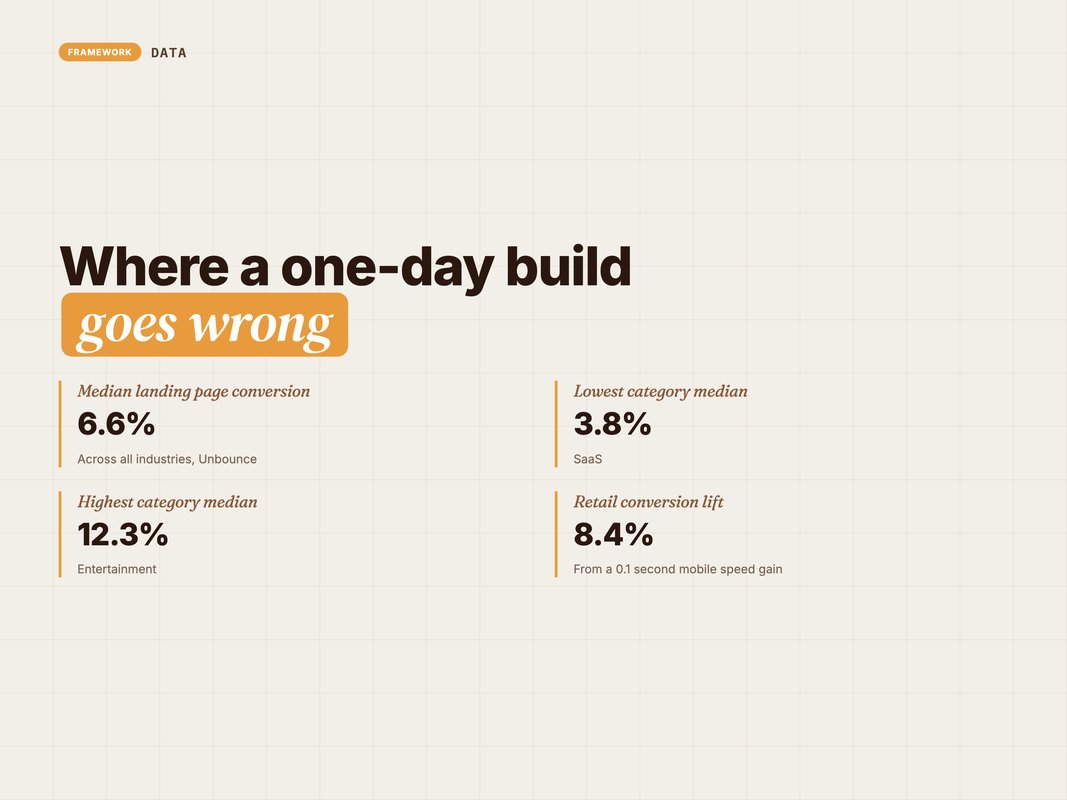
- The median landing page converts at 6.6% across industries — (Source: Unbounce, 2026 — unbounce.com).
- SaaS sits lowest at 3.8%, entertainment highest at 12.3% — (Source: Unbounce, 2026 — unbounce.com).
- That benchmark covers 57 million conversions across 41,000 pages — (Source: Unbounce, 2026 — unbounce.com).
- A 0.1 second mobile speed gain lifted retail conversions 8.4% — (Source: Deloitte and Google, 2020 — deloitte.com).
- The same gain lifted travel conversions 10.1% — (Source: Deloitte and Google, 2020 — deloitte.com).
Why a day is possible now
Three things collapsed the timeline. None of them is "AI writes the copy".
The first is the component library. Your Webflow project already holds a hero, a proof strip, a feature grid, a pricing block and a form. So you are assembling, not designing. That work happened once, months ago.
Building that library is a two-week job you do exactly once. Every page after it is faster because of it. Most teams never do it, and pay the cost on every single build instead.
The second is the brief. Most two-week builds spend nine days waiting for a decision. Who is this for. What is the offer. What proof do we have. Lock those in the first hour and the rest is production.
The third is drafting speed. A model can produce eight headline options in a minute. It can restructure a page in another minute. That used to be a two-day loop with a copywriter.
Notice what is missing from that list. Nothing about quality. AI made drafting cheap, which means you can afford to throw away nine drafts to find the tenth.
Q: Does this only work for simple pages?
A: It works for any page built from parts you already own. A new brand system, custom illustration or a fresh shoot still needs its own timeline.
The stack we actually use
Here is what sits in the workflow, and what each piece is for.
| Tool | Job in the build | Why this one |
|---|---|---|
| Airtable | Brief, copy blocks, status | One row per page, visible to everyone |
| Claude | Draft copy, variants, FAQ, schema | Follows a long brief without drifting |
| Webflow | Component library, CMS, hosting | Reusable blocks and a clean publish step |
| Figma | Any new section that has no component | Only opened when the library falls short |
| PageSpeed Insights | Speed and Core Web Vitals check | Free, and it is what Google measures |
| Google Search Console | Index request after launch | Confirms the page is actually crawlable |
Nothing exotic. The value is in the sequence, not the software.
One rule governs the whole stack. If a step cannot be finished inside its slot, the page ships without it and it gets added tomorrow. Nothing waits.
Hour by hour, the actual build
This is the shape of the day. Times are indicative, but the order is not negotiable.
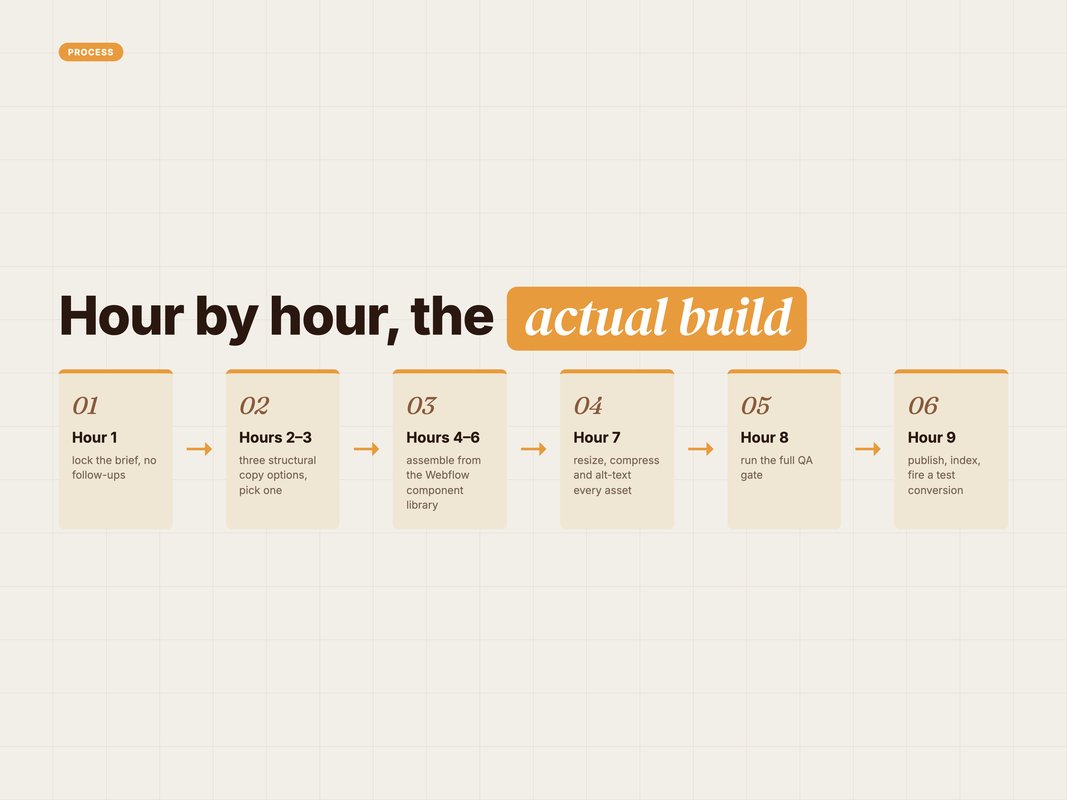
Hour 1 — the brief. One call, one document, no follow-ups. If a decision is missing at the end of the hour, we take the decision ourselves and flag it.
Hours 2 to 3 — copy. We run the brief through a fixed prompt and get three structural options. We pick one. Then we push for variants on the hero and the CTA only.
Hours 4 to 6 — build. Assemble from the component library in Webflow. New sections get built in Figma first, but only if the library truly has no fit.
Hour 7 — assets. Images resized and compressed. Alt text written for every one. No stock photo goes in without a reason.
Hour 8 — QA. The full gate below. This is the hour teams cut, and it is the hour that decides whether the page works.
Hour 9 — launch. Publish, submit to Search Console, fire a test conversion, confirm it lands in the CRM.
Nine hours with breaks is a day. The first time you run it, expect twelve. By the fourth page it settles.
The order matters more than the clock. Copy before build, always. A page assembled first and written into second ends up shaped by the components rather than the argument.
Assets come after build for the same reason. You cannot size an image well until you know the slot it sits in. Doing it earlier means doing it twice.
And QA sits before launch, never after. A page that is live and broken costs more than a page that ships an hour later.
Q: What if the client cannot do the brief call in hour one?
A: Then it is not a one-day build. The clock starts when the brief is locked, not when the request arrives.
The brief that makes it work
The brief is the whole trick. A weak brief produces a fast page nobody wanted.
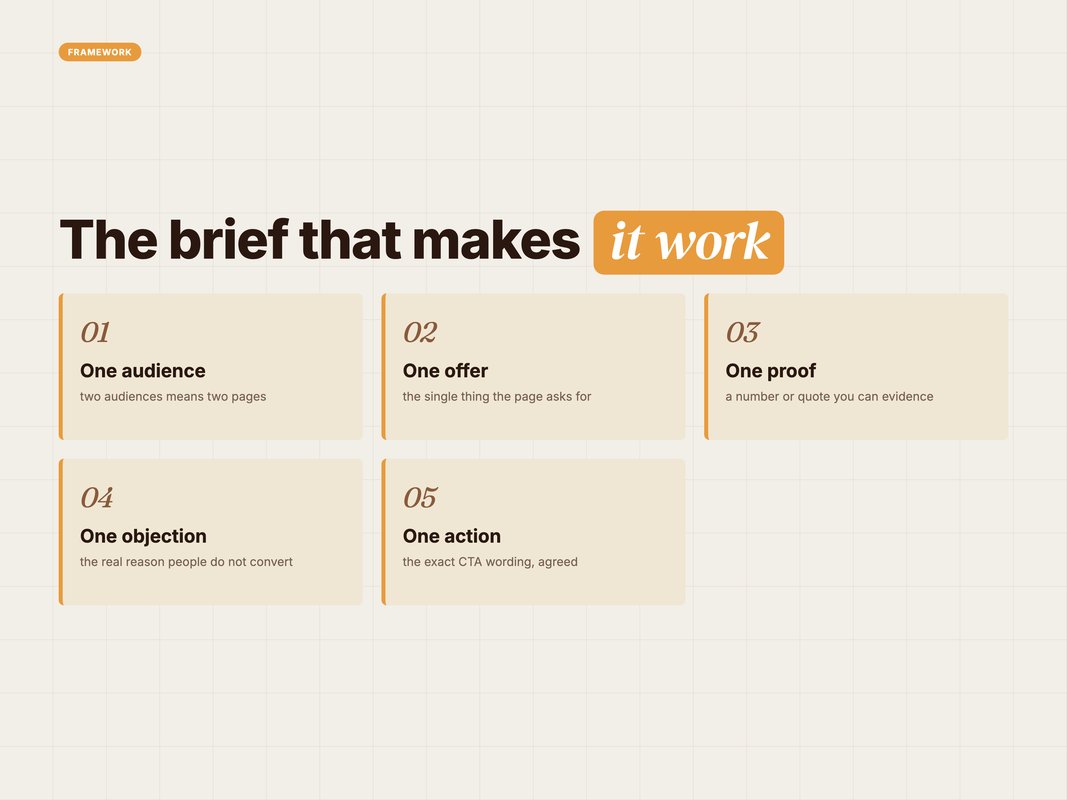
We lock five things and nothing else. One audience. One offer. One proof. One objection. One action.
If a stakeholder asks for two audiences, that is two pages. This is the argument worth having in hour one rather than week two.
Here is the prompt we run once the brief is locked. Fill the brackets and it works on any stack.
You are writing a landing page for [BRAND], a [CATEGORY] business.

AUDIENCE: [one sentence — who. What they are trying to do] OFFER: [the single thing the page asks for] PROOF: [one number, quote or result we can actually verify] TOP OBJECTION: [the real reason people do not convert] ACTION: [the exact CTA wording]

Write three structurally different versions of the page. Each must include: hero headline, subhead, three benefit blocks, one proof block, one objection-handling block, FAQ of five questions, and the CTA section.

Rules:
- Every sentence under 18 words.
- No claim that is not in PROOF.
- Address TOP OBJECTION directly, in its own block, in plain words.
- Do not invent statistics, awards, or customer names.
- Label each version with the angle it takes in one line.
Three versions matters more than three headlines. Different structures surface different arguments, and you learn which argument the page should make.
Then a second, shorter prompt for the hero alone:
Take version [N]. Write 8 alternative hero headlines.
Four should lead with the outcome. Four should lead with the objection.
Under 12 words each. No colons. No wordplay.
Eight options takes a minute to generate and five minutes to choose from. That is the part that used to take two days.
What AI writes well, and what it does not
This is the line we have learned to hold. Getting it wrong is how teams ship confident, generic pages.
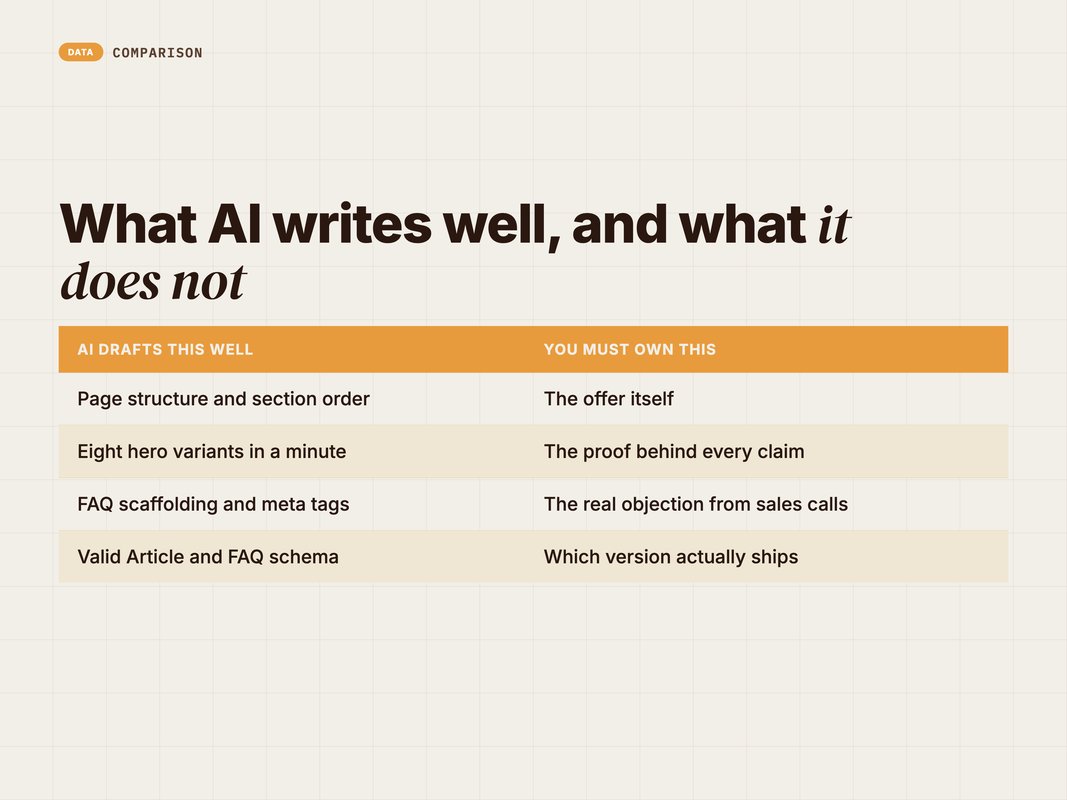
AI is strong on structure. It will produce a clean page skeleton, sensible section order, a decent FAQ and valid schema every time.
It is weak on the three things that actually convert. The offer. The proof. The objection.
The offer is a business decision. A model will happily invent a better one and you will not notice until the page is live.
The proof has to be real. Any number the page states must trace to something you can show. If it cannot, the number comes out. We hold our own content to the same rule.
The objection is the hardest. It comes from sales calls, support tickets and churn interviews. No model has that unless you paste it in.
So the split is simple. AI drafts the structure. You write the truth.
There is a practical tell for when the split has slipped. Read the page and underline every claim. If you cannot name the source of a claim in five seconds, a model wrote it and nobody checked.
We keep a short source line next to every number in the brief document. Not on the page. In the brief. That way the person building version four still knows where the figure came from.
The same discipline applies to the FAQ. A model writes plausible questions. Your support inbox holds the real ones. Paste ten real tickets into the prompt and the FAQ stops sounding invented.
Q: How many drafts do you actually keep?
A: One structure, one hero, one CTA. Everything else is discarded. The value is in choosing, not in generating.
The QA gate before you publish
A fast page is only good if it clears the same bar as a slow one. This gate is non-negotiable and takes about 45 minutes.
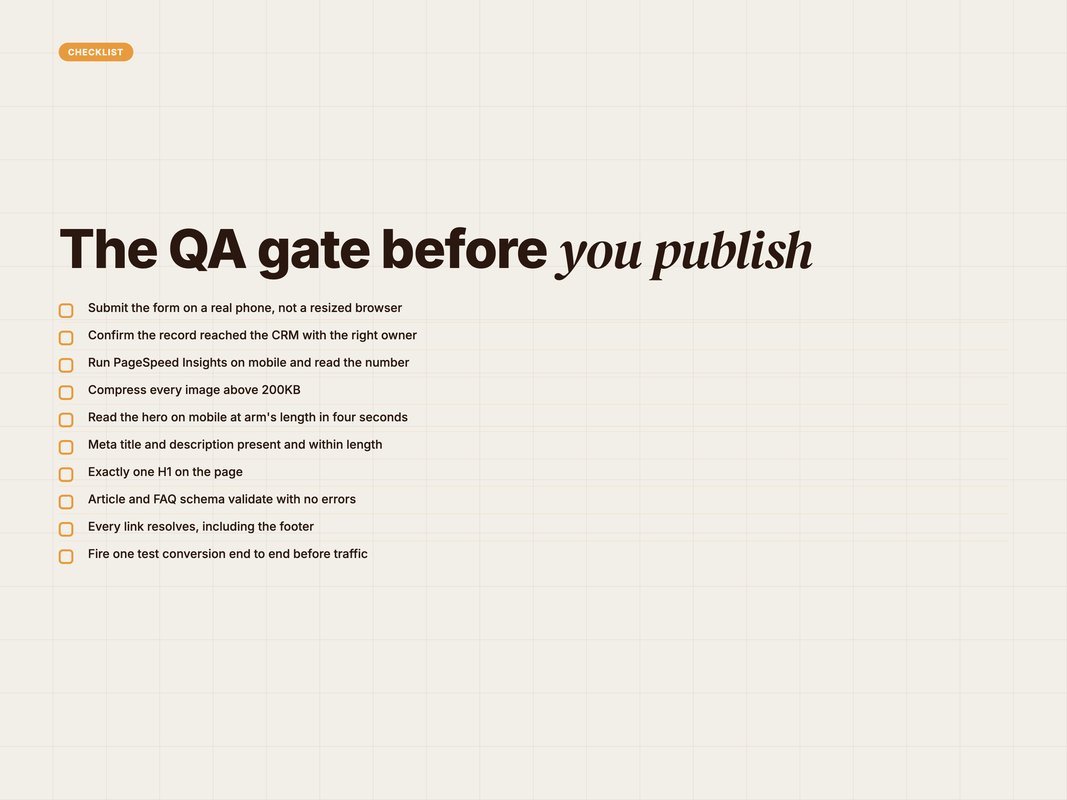
Three of those deserve extra attention.
Test the form on a real phone. Not a browser resize. An actual device, an actual submission, and confirmation that the record reached the CRM with the right owner.
Check speed before you celebrate. Deloitte and Google found that a 0.1 second improvement in mobile load time lifted retail conversions by 8.4% and average order value by 9.2% (Source: Deloitte and Google, 2020 — deloitte.com). Travel conversions rose 10.1% on the same gain. A hero image nobody compressed can cost you more than the copy earned.
Read the page on mobile at arm's length. If the offer is not obvious in four seconds, the hero is wrong. Fix it before traffic arrives, not after.
The gate also catches the boring stuff. Meta title and description present. One H1. Schema that validates. Tracking that fires. Every link resolving.
We run this same discipline across our content work. The reasoning is the same one we set out in How to Build an Automated Blog Pipeline with Claude + Airtable.
Where a one-day build goes wrong
Four failure modes, in the order we see them.
The brief was not locked. Someone adds a second audience on hour six. The page now serves neither. This is a process failure, not a speed failure.
The library was not ready. If half the sections need building from scratch, it is a three-day job wearing a one-day label. Be honest on hour one.
Nobody owned the proof. The page goes live with a claim that cannot be evidenced. That is a bigger risk than a slow launch, and it is entirely avoidable.
QA got cut for launch. The form did not route. The page was live for six days before anyone noticed. We have seen this cost more than the campaign spent.
There is a fifth, quieter one. Speed becomes the goal. A team starts shipping pages nobody asked for because it can. Volume without a hypothesis is just noise with a deploy step.
Every page should answer one question you did not know the answer to. If it does not, do not build it.
The fix for all five is the same. Write the hypothesis at the top of the brief before anything else. One sentence, in this shape: we think this audience will respond to this offer, because of this proof.
If nobody can write that sentence, the page is not ready to build. That is worth catching in hour one, when it costs nothing.
It also settles arguments. A stakeholder who wants a section added has to say which part of the hypothesis it serves. Most requests do not survive that question.
We also keep a running log of every page we ship. Date, hypothesis, result, and one line on what we learned. It takes two minutes and it stops the same test being run twice by different people.
After twenty pages, that log is worth more than any of the individual pages. It is the only place your team's actual conversion knowledge lives.
What we measure after launch
A page is not finished when it publishes. It is finished when you know whether it worked.
We track four things and ignore everything else for the first fortnight.
| Metric | What good looks like | Why it is on the list |
|---|---|---|
| Conversion rate | At or above your category median | The only number the page exists to move |
| Cost per qualified lead | Below your blended average | Filters out cheap but useless volume |
| Mobile load time | Under two seconds | Speed moves conversion on its own |
| Form completion rate | Above 60% of starts | Isolates a broken form from a weak offer |
The median landing page converts at 6.6% across industries, from a low of 3.8% in SaaS to a high of 12.3% in entertainment (Source: Unbounce, 2026 — unbounce.com). That benchmark comes from 57 million conversions across 41,000 pages.
Use your own category, not the blended number. A 5% SaaS page is doing well. A 5% events page is not.
Form completion rate is the underrated one. A page with strong traffic and weak completions usually has a form problem, not a message problem. That is a fifteen-minute fix, and most teams spend a month rewriting the hero instead.
Give it two weeks before judging. Then either scale it, fix the one thing the data points at, or kill it and build the next one tomorrow.
What we do at YARD
We are an AI-first growth marketing agency. We run performance marketing, LLM SEO, AI creative and AI funnels for D2C and B2B brands.
Landing pages sit in an awkward spot for most teams. Marketing owns the message. Design owns the look. Development owns the deploy. Three calendars, three queues, and a campaign waiting on all of them.
We collapse that into one owner and one day. The brief call, the copy, the build, the QA and the launch run through the same team on the same clock.
The first page we build with a new client usually takes two days. That is the setup tax. We are building the component library, agreeing the QA gate, and wiring the tracking. From page two, it is a day.
What clients tell us matters most is not the speed. It is that a test no longer needs a two-week commitment. When a page is a day of work, you stop debating which idea to try and simply try both.
That changes the kind of marketing a team is willing to do. It is the difference between one big bet a quarter and eight small ones.
If you want the brief template and the QA checklist we use, we will send them. No retainer required.
The takeaway
A one-day landing page is not a shortcut. It is the same work with the waiting removed.
The three moves that make it possible are all boring. Build the component library once. Lock the brief in an hour. Never cut the QA gate.
AI is the smallest part of it. It drafts fast and it drafts a lot, which lets you discard nine options to find the right one. It does not decide your offer, and it cannot supply your proof.
Start with one page. Time it honestly. Then find the hour you actually lost and fix that.
You can book a call with our team if you want us to run the first one with you.
FAQ
Q: Can you really build a landing page in one day?
A: Yes, for a page that reuses an existing design system. A day covers brief, copy, build, QA and launch. It does not cover new brand design, custom illustration or a fresh photoshoot.
Q: What is a good landing page conversion rate?
A: Unbounce puts the median at 6.6% across industries, from a low of 3.8% in SaaS to a high of 12.3% in entertainment. Judge your page against your own category, not the average.
Q: Does page speed really change conversions?
A: Yes. Deloitte and Google found a 0.1 second improvement in mobile load time lifted retail conversions by 8.4% and average order value by 9.2%. Travel conversions rose 10.1%.
Q: Should AI write the whole landing page?
A: No. AI is strong on structure, variants, FAQ and meta. It is weak on the offer, the proof and the specific objection your buyer actually has. Those three come from you.
Q: What breaks most often in a one-day build?
A: Form routing, mobile spacing and tracking. In that order. Every one-day page should be tested on a real phone with a real form submission before traffic is pointed at it.
Q: Do you need Webflow specifically?
A: No, but you need a CMS with a reusable component library and a clean publish step. Webflow gives us that. The method works on any stack with the same two properties.
Insights from Our Experts
Explore our latest articles on digital marketing strategies.