

Your designer ships a beautiful landing page in Figma. Then a developer rebuilds it from scratch. The Figma MCP server kills that second step.
Figma MCP is the bridge. It hands your Figma design straight to an AI coding agent. The agent reads the frame, the tokens, and the layout. Then it writes real code.
This guide is a working playbook. We connect the Figma MCP server to Claude Code. We select a landing-page frame. We pull design context. We generate production HTML and React. Then we sync it back.
You get copy-pasteable commands. You get real prompts. You get the exact flow we run for marketing pages.
The handoff pain is real and measured. Below, we show where Figma MCP saves hours, and where it still needs you.
What the Figma MCP Server Actually Is
Let's ground this first. Then we build.
MCP stands for Model Context Protocol. It is a shared standard. It lets AI agents talk to outside tools in one common language.
The Figma MCP server is Figma's version of that. It brings your Figma design into an AI coding tool. Figma launched the Dev Mode MCP server in beta on June 4, 2025 (Source: Figma, 2025 — figma.com/blog).
Here is the core idea. The server exposes your design as structured context. Your agent reads that context. Then it generates design-informed code.
It works two ways. It reads designs into code. And it writes content back to the Figma canvas.
There are two flavours. A remote server and a desktop server. Figma recommends the remote one. It connects to Figma's hosted endpoint and ships the broadest feature set (Source: Figma Developer Docs, 2026 — developers.figma.com).
It plugs into agentic coding tools. Claude Code, Cursor, VS Code, and Windsurf all connect (Source: Figma, 2025 — figma.com/blog). We use Claude Code here.
Q: What does the Figma MCP server do in one line?
A: It feeds your Figma design context to an AI coding agent so the agent can write code that matches the design, and it can also push generated content back onto the Figma canvas.
Why This Matters for Marketing Teams
Marketing pages ship on deadlines. A campaign date does not move.
But the handoff between design and build is slow. And it is expensive. The numbers are stark.
91% of developers and 92% of designers say the handoff process could be improved (Source: Figma, 2025 — figma.com). That is near-total agreement.
Most teams feel it weekly. Around 84% of designers say they work with developers at least once a week (Source: Figma, 2025 — figma.com). Each pass burns time.
Figma MCP compresses that loop. Your agent reads the design once. It builds the first version in minutes.
The speed gains are proven elsewhere too. Developers using an AI coding assistant finished a set task 55% faster than those without one (Source: GitHub, 2022 — github.blog). Design context makes those agents more accurate, not just faster.
That speed is why we build this into our stack. For a marketing team, it means faster tests. More landing pages. Less waiting.
Q: Who is Figma MCP for on a marketing team?
A: It suits anyone shipping web pages fast: growth marketers, web leads, and lean dev teams. If you run landing-page tests or campaign microsites, the design to code loop is your bottleneck, and this shrinks it.
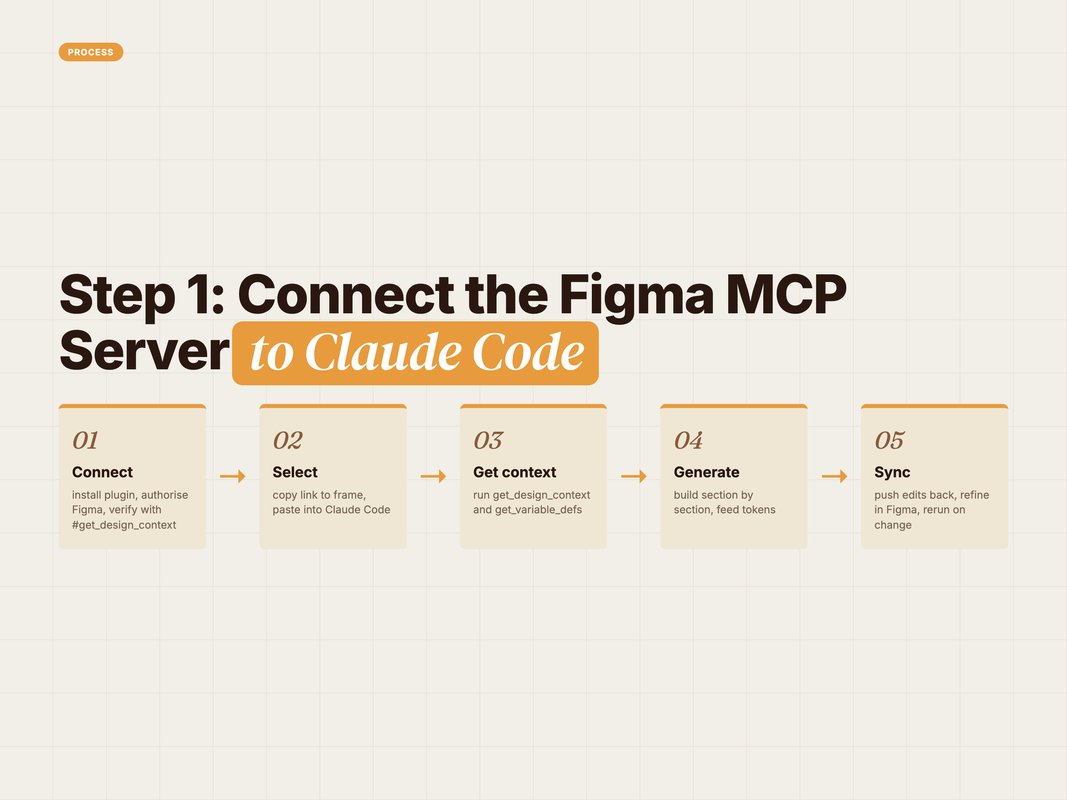
Step 1: Connect the Figma MCP Server to Claude Code
Now the hands-on part. Setup takes a few minutes.
Install the Figma plugin inside Claude Code. Run this in your terminal:
claude plugin install figma@claude-plugins-official
Restart Claude Code if it was already open. Then open the plugin marketplace:
/plugin
Move to the Installed tab. Select the figma server. Press Enter to open the auth page.
Click Allow access. This links Claude Code to your Figma account. Run /plugin again to confirm it shows as connected (Source: Figma Learn, 2026 — help.figma.com).
Prefer the desktop server? Toggle Dev Mode's MCP server on in Figma. Then add it with one command:
claude mcp add --transport http figma-desktop http://127.0.0.1:3845/mcp
Now verify the tools loaded. In your Claude Code chat, type:
#get_design_context
If it resolves, you are connected. The remote server is the safe default for most teams (Source: Figma Developer Docs, 2026 — developers.figma.com).
Q: Should I use the remote or desktop Figma MCP server?
A: Start with the remote server. Figma recommends it and it carries the widest feature set. Only pick the desktop server if your org needs local control or offline access.
Step 2: Select the Frame and Pull Design Context
The server is live. Now point it at your page.
Open your landing-page design in Figma. Right-click the top-level frame. Choose Copy link to selection.
Go back to Claude Code. Paste that link into your prompt. Then ask the agent to read it.
Here is a prompt we use:
Read this Figma frame with get_design_context and get_variable_defs.
Summarise the layout as sections, then list every color, spacing,
and typography token. Do not write code yet.
[paste Figma selection link]
Two tools do the heavy lifting here. get_design_context returns a structured version of your selection. By default that is React plus Tailwind (Source: Figma Developer Docs, 2026 — developers.figma.com).
The second tool matters just as much. get_variable_defs pulls the variables and styles in your selection. That means your real colors, spacing, and type scale (Source: Figma Developer Docs, 2026 — developers.figma.com).
Why read first, code later? Because it forces a shared plan. You confirm the sections before a single line is written.
Add get_screenshot for a visual anchor too. Figma notes that screenshots plus code outputs beat either one alone (Source: Figma, 2025 — figma.com/blog).
Q: What is the difference between get_design_context and get_variable_defs?
A: get_design_context returns the structure and a code draft of your frame. get_variable_defs returns the design tokens, your colors, spacing, and type. Use both so the code matches your system, not generic values.
Step 3: Generate Production HTML and React
Context is loaded. Now you build.
Do not ask for the whole page at once. Go section by section. It gives you cleaner, reviewable code.
Start with the hero. Here is a real prompt:
Using the design context and tokens you just read, build the hero
section as a single React component with Tailwind. Use my token
values, not hard-coded hex. Make it responsive. Add semantic HTML
and alt text placeholders for images.
The default output is React plus Tailwind. But you are not locked in. You can ask for another stack right in the prompt (Source: Figma Developer Docs, 2026 — developers.figma.com).
Need plain markup for a Webflow embed or a CMS? Ask for it:
Rebuild that hero as plain semantic HTML and CSS. No framework.
Keep the same tokens and spacing. Output one HTML file.
Then move down the page. Features. Social proof. The form. The footer. One prompt each.
Pulling design tokens has a side benefit. It makes the generated code more precise and cuts token usage on the model (Source: Figma, 2025 — figma.com/blog). Leaner context, sharper output.
Review each section as it lands. Check spacing against the screenshot. Fix links and copy. Then move on.
Q: Can Figma MCP output more than React?
A: Yes. React plus Tailwind is only the default. You can request Vue, plain HTML and CSS, iOS, or another target in your prompt. The agent adapts the same design context to your stack.
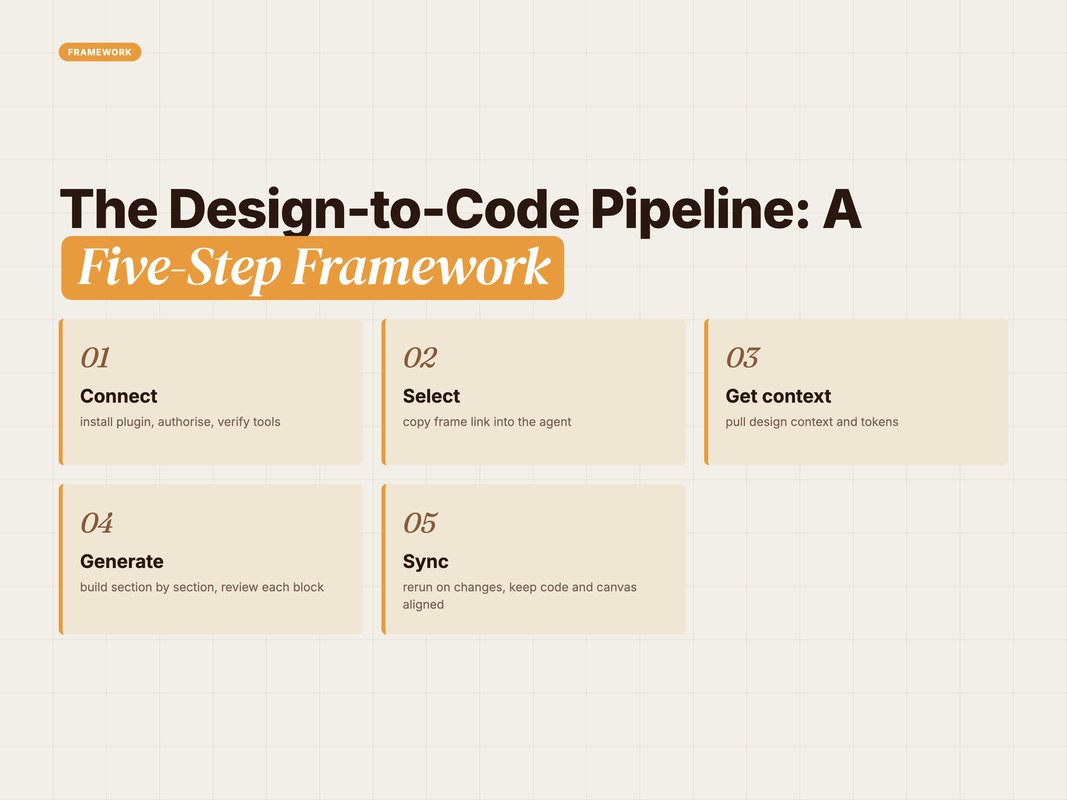
The Design-to-Code Pipeline: A Five-Step Framework
Here is the whole flow as one repeatable model. We call it the CSGSS loop.
Use it for every marketing page. It keeps the process tight.
- Connect — Install the plugin. Authorise Figma. Verify with
#get_design_context. - Select — Copy link to your frame. Paste it into Claude Code.
- Get context — Run
get_design_contextandget_variable_defs. Confirm the plan. - Generate — Build section by section. Feed tokens. Review each block.
- Sync — Push edits back, refine in Figma, and rerun on changes.
The magic is step five. This is a loop, not a one-way street.
Say marketing tweaks the hero headline in Figma. You do not rebuild. You re-select the frame and rerun get_design_context. The agent updates only what changed.
The server can even write back to the canvas. It can create and modify native Figma content directly (Source: Figma Developer Docs, 2026 — developers.figma.com). Design and code stay in step.
Quick Facts: Design-to-Code Handoff at a Glance.
- Nearly all say handoff is broken: 91% of developers and 92% of designers want it improved. (Source: Figma, 2025 — figma.com/resource-library).
- Most feel the speed-up: 78% of design and dev professionals say AI tools speed their workflows. (Source: Figma, 2025 — figma.com/resource-library).
- Real gains are measured: developers with an AI assistant finished a task 55% faster. (Source: GitHub, 2022 — github.blog).
- The future is set: 85% of designers and developers say AI will be essential to success. (Source: Figma, 2025 — figma.com/resource-library).
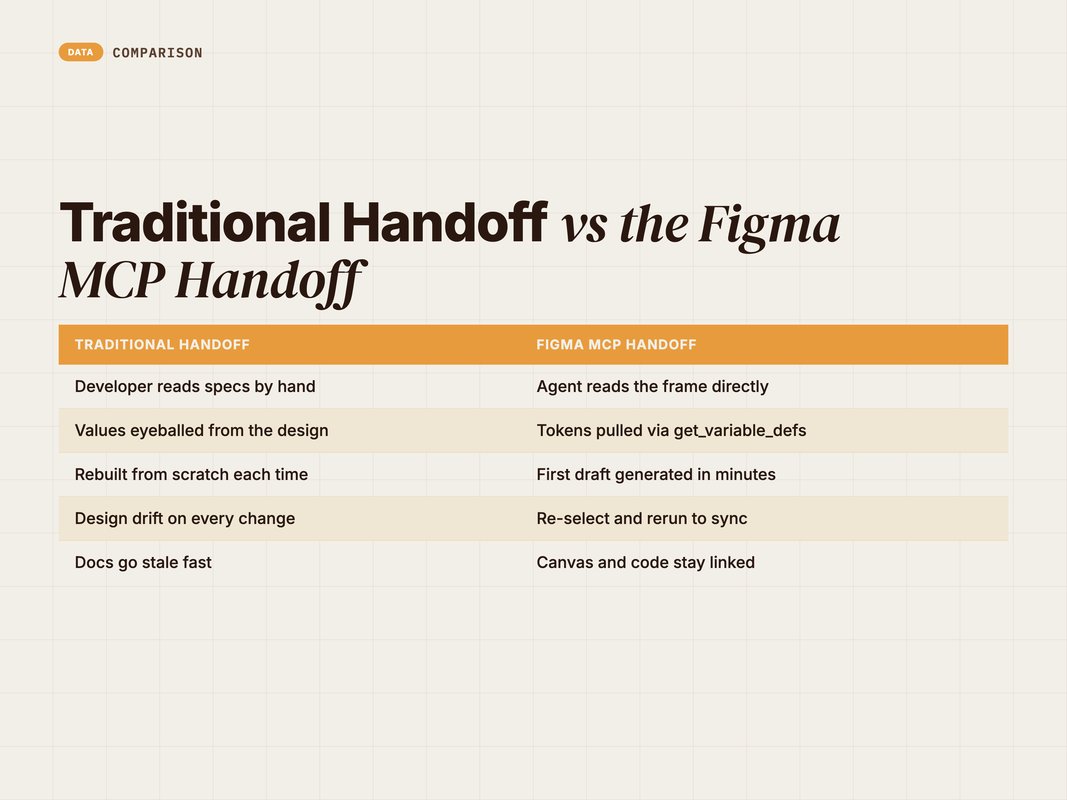
Traditional Handoff vs the Figma MCP Handoff
Old way versus new way. The gap is wide.
The old handoff is manual. A designer writes specs. A developer eyeballs pixels and rebuilds. Details slip in translation.
The MCP handoff reads the design as data. Tokens transfer exactly. The first draft appears in minutes.
Here is the side-by-side:
| Traditional handoff | Figma MCP handoff |
|---|---|
| Developer reads specs by hand | Agent reads the frame directly |
| Values eyeballed from the design | Tokens pulled via get_variable_defs |
| Rebuilt from scratch each time | First draft generated in minutes |
| Design drift on every change | Re-select and rerun to sync |
| Docs go stale fast | Canvas and code stay linked |
This is why AI sits at the centre of our stack. Some 78% of professionals say AI tools speed up their workflows (Source: Figma, 2025 — figma.com).
The old way is not gone. You still review, wire up, and ship. But the grunt work shrinks a lot.
Q: Does Figma MCP replace the developer?
A: No. It removes the repetitive rebuild, not the judgment. You still handle logic, forms, tracking, and quality. The agent gives you a fast, accurate first draft to build on.
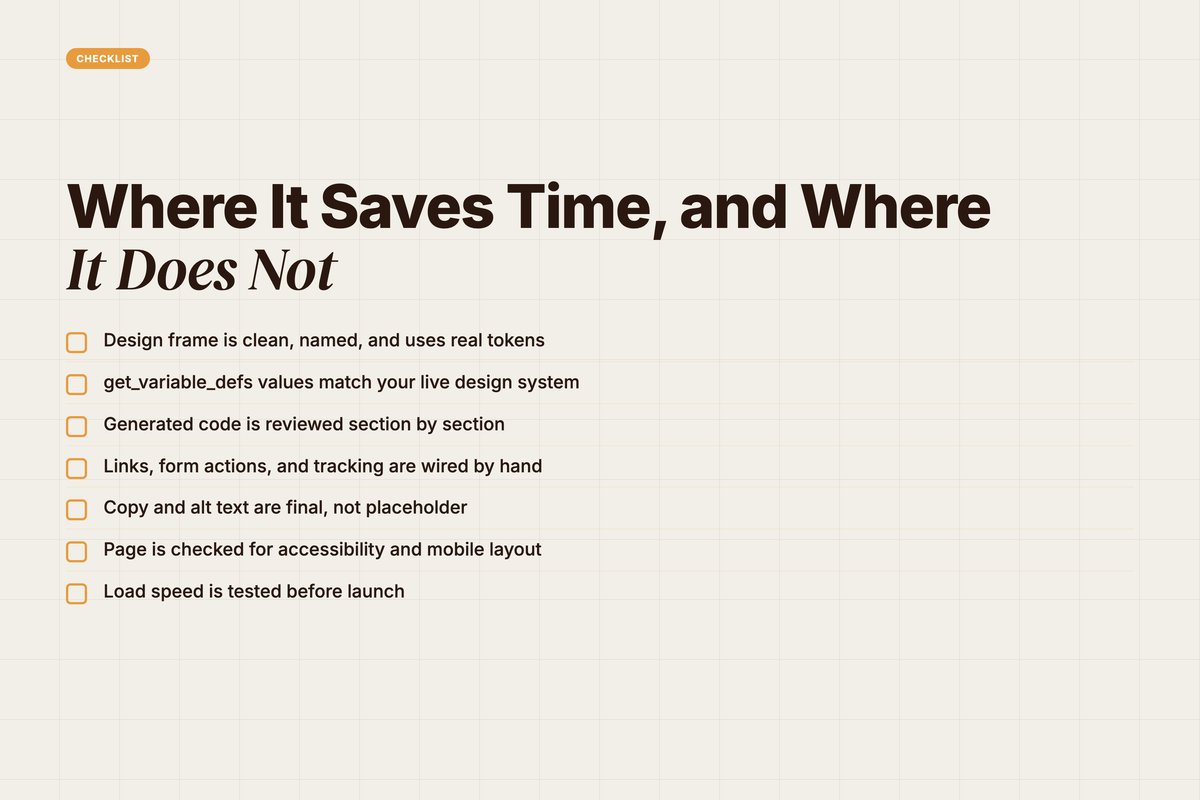
Where It Saves Time, and Where It Does Not
Be honest about the tool. It is powerful. It is not magic.
It saves the most time on structure. Layout, spacing, and tokens come out fast and close. That first pass is the slow part of any build.
It shines on repetitive pages. Campaign microsites. Landing-page variants. A/B test versions. Same system, new frame.
But it has real limits. The server reads what is on the canvas, not your intent. A messy design gives messy code.
It does not know your backend. It will not wire your forms, your CMS, or your tracking pixels. That is still your job.
And output needs a human pass. You own accessibility. You own performance. You own the final copy and links.
Use this checklist before you ship any MCP-built marketing page.
- Design frame is clean, named, and uses real tokens.
- get_variable_defs values match your live design system.
- Generated code is reviewed section by section.
- Links, form actions, and tracking are wired by hand.
- Copy and alt text are final, not placeholder.
- Page is checked for accessibility and mobile layout.
- Load speed is tested before launch.
Q: What is the biggest limitation of Figma MCP?
A: It reads the canvas, not intent. Loose or unstructured designs produce loose code. It also does not handle your CMS, forms, or tracking. Treat the output as a strong draft that still needs review.
How We Use This at YARD
We are an AI-first growth marketing agency. Performance marketing, LLM SEO, AI creatives, and AI funnels for D2C and B2B brands.
Speed is the whole point. Campaigns move fast. Landing pages have to keep up.
So we wire tools like the Figma MCP server into our build flow. A designer ships a frame. Claude Code reads it. A first-draft page appears in minutes, not days.
That frees our team for the work that matters. Messaging. Offer strategy. Conversion logic. The parts a model cannot own.
We treat AI as a teammate, not a replacement. The agent handles the rebuild. Our operators handle the judgment.
This is the YARD way. We find the slow step. We automate it. Then we spend the saved time on strategy.
If your team ships marketing pages every week, this loop is worth building. Fewer handoffs. Faster tests. More shots on goal.
Want a stack like this for your brand? That is exactly what we set up for the clients we work with.
Conclusion: Ship Faster, Handoff Less
The Figma MCP server changes the design-to-code loop. It turns a manual rebuild into a fast, accurate draft.
You connect the server to Claude Code. You select a frame. You pull context and tokens. You generate the page section by section. Then you sync.
The wins are real. Cleaner handoffs. Faster landing pages. More room for the strategy that drives results.
But keep your hands on the wheel. Review the code. Wire the logic. Own the quality. Figma MCP is a strong teammate, not an autopilot.
Marketing teams live and die on speed. This is one of the cleanest speed wins available right now.
Want a marketing stack that ships pages this fast? Let's map it to your team. Book a call with YARD.
FAQ
Q: What is the Figma MCP server?
A: The Figma MCP server is Figma's Model Context Protocol server. It feeds design context from a Figma file into an AI coding agent. The agent then generates code that matches the design. It also lets the agent write content back to the Figma canvas.
Q: Does Figma MCP work with Claude Code?
A: Yes. Claude Code is a supported Figma MCP client. You install the Figma plugin, authorise your account, and the tools appear. Then you select a frame and prompt Claude Code to build it.
Q: What does get_design_context return?
A: By default get_design_context returns a React plus Tailwind version of your selection. It is a starting point, not a lock-in. You can ask for Vue, plain HTML and CSS, or another stack in your prompt.
Q: Is the remote or desktop Figma MCP server better?
A: Figma recommends the remote server for most teams. It connects to Figma's hosted endpoint without the desktop app. The remote server also ships the broadest set of features. Use the desktop server only if your org requires local control.
Q: Can Figma MCP build a full marketing landing page?
A: It can build most of one fast. The first pass gets structure, spacing, and tokens right. You still review copy, links, animation, and edge cases by hand. Treat the output as a strong draft, not a final page.
Q: What are the limits of Figma MCP for marketing pages?
A: It reads what is on the canvas, not intent. Loose designs make loose code. It does not know your CMS, forms, or tracking. And it will not replace review. You still own quality, accessibility, and performance.
Insights from Our Experts
Explore our latest articles on digital marketing strategies.