

Publishing a blog is not the finish line. Getting it into Google's index is.
Most teams find out weeks late. Someone opens Search Console, sorts by date, and spots four posts that were never crawled. By then the moment has passed.
We got tired of that check being manual. So we built a small workflow. It runs every morning, writes what it finds into one table, and tells us only what is stuck. This post is the build.
You get the node-by-node design. You get the API limits that shape it, the parsing code, and an honest list of what this cannot do.
What This Workflow Actually Does
Start with the job, not the tools.
Every day, the workflow reads our sitemap. It compares that list against a table of every URL we already know about. New URLs get added. Known URLs get re-checked against Google.
The check itself asks one question per URL. Is this page in the index right now?
The answer, plus the date and the raw coverage state, gets written back to the table. Pages already marked indexed stop being re-checked, which keeps us inside the daily quota.
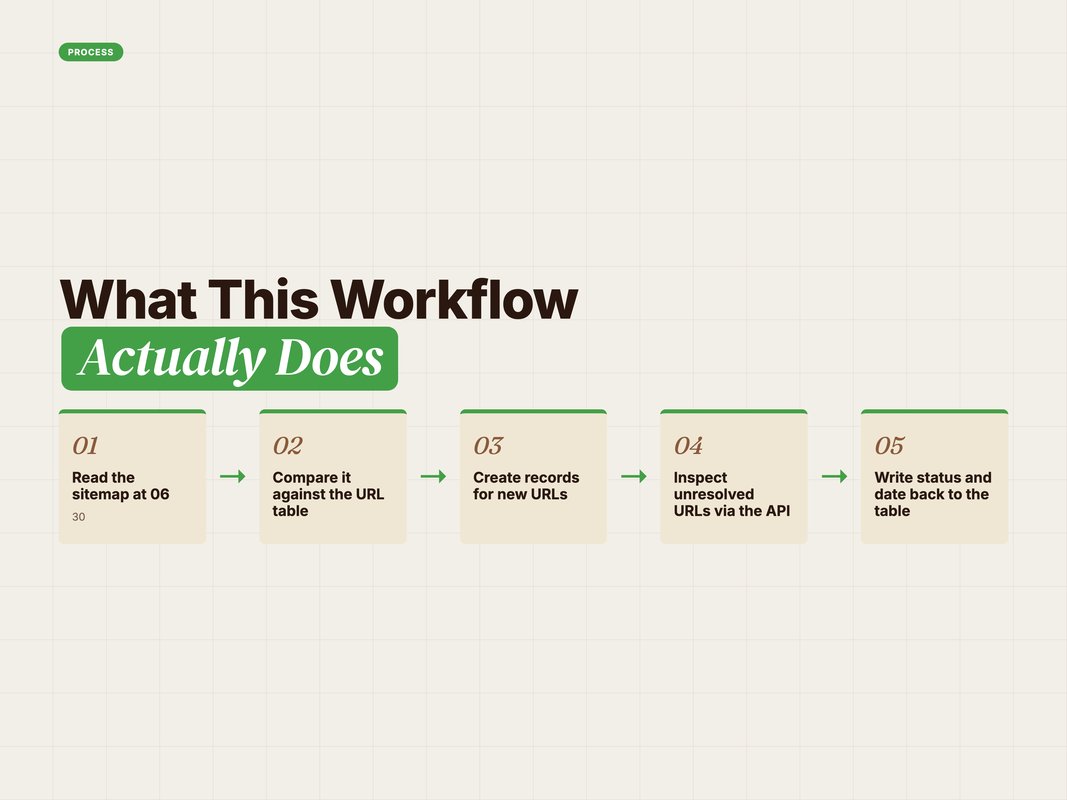
That is the whole loop. Sitemap in, status table out.
What makes it useful is not clever code. It is that the table has memory. You can see when a page first appeared, when it was last checked, and how long it has been stuck.
Q: Why not just open Search Console?
A: Because the dashboard shows you totals, not the specific page that quietly failed nine days ago. A table with dates gives you the page. A chart does not.
The Hard Limits You Must Design Around
Before the build, the rules. Three of them shape every decision.
One. You cannot force indexing. Sitemaps and inspection calls are hints. Google decides. Any tool promising guaranteed indexing is selling you something (Source: Google Search Central, 2026 — developers.google.com).
Two. The Indexing API is not for blogs. Google documents it for JobPosting and BroadcastEvent pages only (Source: Google Search Central, 2026 — developers.google.com). Plenty of guides ignore this. We do not.
Three. The URL Inspection API has a quota. You get 2,000 calls per property per day. It is built for targeted checks, not bulk crawling (Source: MB Advertising, 2026 — mbadv.agency).
Those three facts explain the whole design.
If you cannot force indexing, the goal shifts. You are not chasing a button. You are building an early warning system.
If the quota is 2,000 a day, you must stop re-checking pages that already passed. That single rule is what keeps a growing site inside the limit.

Q: What happens if I blow through the quota?
A: Calls start failing and your run ends with half a picture. Batch, add a wait between calls, and skip anything already marked indexed.
The Node Design, Step by Step
Here is the actual shape of the workflow. It runs in n8n, but the logic ports to any orchestrator.
Trigger. A daily schedule at 06:30, plus a webhook so we can force a run by hand.
Get a Google token. A POST to the Google OAuth token endpoint, using a stored refresh token. This returns a short-lived access token for the rest of the run.
Fetch the sitemap. A plain GET on the site's sitemap URL.
Parse it. A small code node pulls out every <loc> value and drops any entry that is itself an XML file. That last filter matters on sites with sitemap indexes.
List the table. A GET against the Airtable table that holds every URL we have ever seen.
Plan the work. A code node compares the two lists. It normalises trailing slashes, keys the records by URL, and splits the result into new URLs and known URLs.
Branch. New URLs get created as records first, then join the inspection queue. Known URLs go straight to the queue.
Loop with a wait. The queue is processed in batches, with a deliberate pause between calls. This is the quota guard.
Inspect. A POST to the URL Inspection endpoint for each URL.
Map the verdict. A code node reads the index status result, converts the verdict into a plain status, and stamps today's date.
Write back. A PATCH updates the record with status, coverage state and last-checked date.
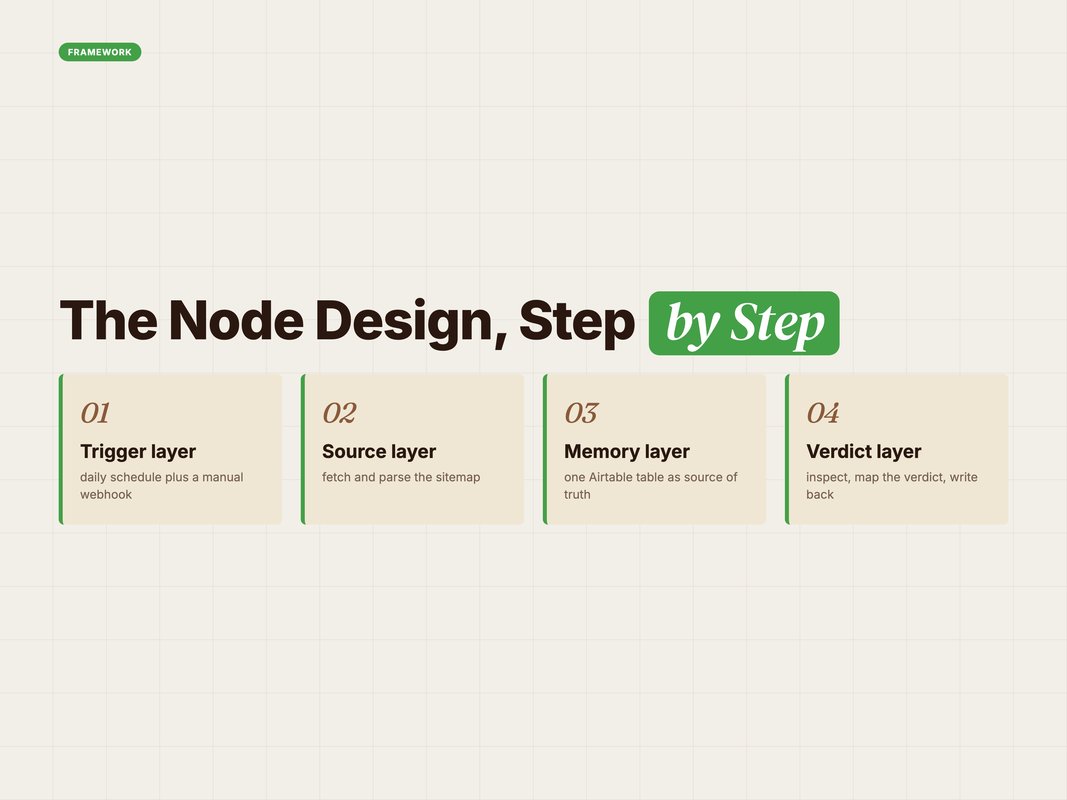
The design has one opinion baked in. The table is the source of truth, not the sitemap and not Search Console.
That is deliberate. Sitemaps change. Dashboards expire their data. A table you own does neither.
Q: Does this need n8n specifically?
A: No. It is a schedule, six HTTP calls and three code nodes. Make, Zapier with code steps, or a cron job would all work. We use n8n because self-hosting keeps the credentials in-house.
The Two Code Nodes That Matter
Most of this workflow is HTTP configuration. Two small code blocks carry the logic.
The first parses the sitemap. It is four lines and it needs to be tolerant of whitespace.
const xml = $json.data || '';
const urls = [...xml.matchAll(/<loc>\s*([^<]+?)\s*<\/loc>/g)]
  .map(m => m[1])
  .filter(u => !u.endsWith('.xml'));
return [{ json: { urls } }];
The .xml filter is the part people forget. Without it, a sitemap index feeds child sitemap files into your URL queue and every one of them fails inspection.
The second node plans the work. Its job is to answer one question per sitemap URL. Have we seen this before?
const urls = $('Parse Sitemap').first().json.urls;
const records = $input.all().flatMap(p => p.json.records || []);
const norm = u => (u || '').replace(/\/+$/, '');
const byUrl = {};
for (const r of records) byUrl[norm(r.fields['URL'])] = r;
Note the norm helper. Trailing slashes are the single most common cause of duplicate rows in this kind of table.
Normalise on both sides, every time. It costs one line and saves a weekly cleanup.
The verdict mapping is the third small piece. Google returns a verdict of PASS when a URL is indexed. The mapping is simple: PASS becomes indexed, anything else becomes not indexed. The raw coverage string gets stored alongside it.
Keep that raw string. "Crawled. Currently not indexed" and "Discovered — currently not indexed" are very different problems, and the plain status hides the difference.
Where Claude Actually Fits
The pipeline is plain HTTP. So where does the AI go?
Three places, and none of them are inside the daily run.
Building it. The parsing code, the planning logic and the verdict mapping were all written in a Claude session against the real API responses. Pasting one sample payload and asking for the mapping code is faster than reading the reference twice.
Reading the output. Once the table has a few hundred rows, the useful question is not "what is the status". It is "what pattern is in the failures". Feeding the table export to Claude and asking for clusters surfaces things a sort does not.
Turning findings into fixes. A cluster of "discovered, not indexed" pages on one template is a crawl or quality problem. A cluster of "crawled, not indexed" is usually thin content. Claude is good at turning that into a specific fix list.
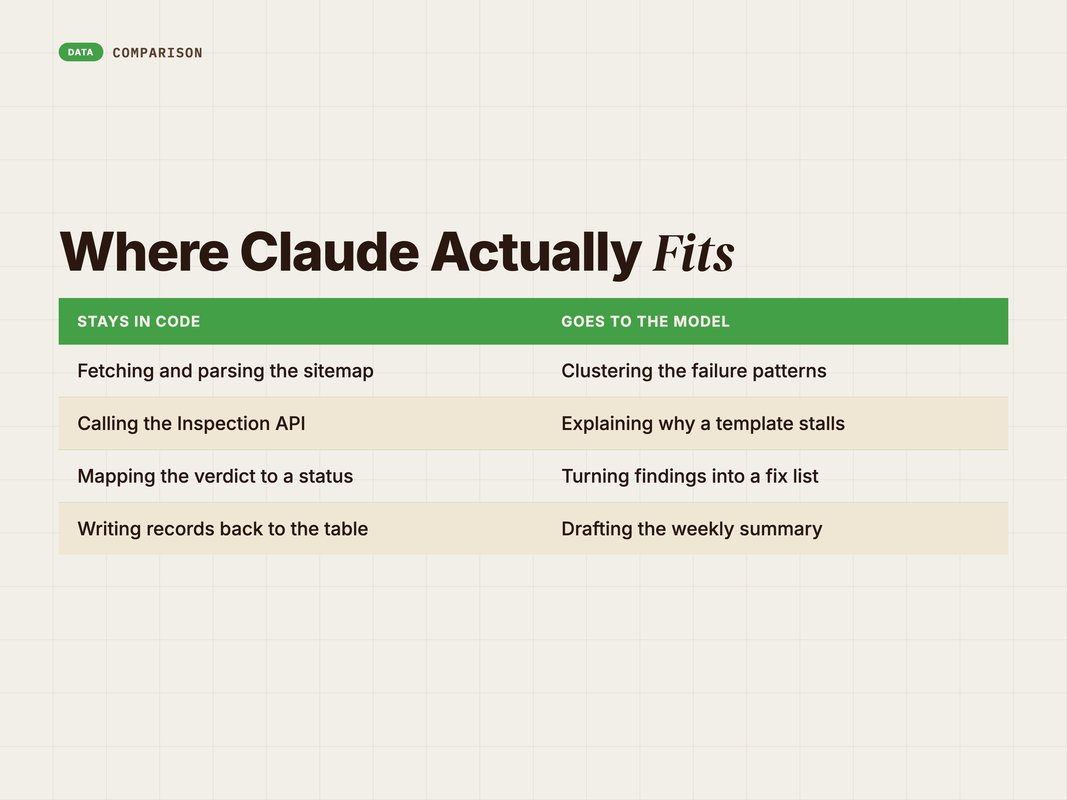
The rule we follow is simple. Deterministic work stays in code. Judgement work goes to the model.
Nobody wants an AI deciding whether a page is indexed. That is a fact, and facts belong to the API.
The same split applies to reporting. The table holds the numbers. The model writes the summary. If those two ever disagree, the table wins.
It also keeps costs flat. A daily run that calls a model for every URL would scale badly. A daily run that calls a model once a week, on an export, costs almost nothing.
Q: Could an agent run the whole thing?
A: It could, and it would be slower, pricier and less reliable. A fixed pipeline with a model on the analysis end is the better split for anything that runs daily.
What It Costs and What It Catches
Running cost is close to zero. Self-hosted n8n, a Google API with a free quota, and one Airtable base you already have.
The real cost is setup. Budget half a day for the first build, mostly on OAuth.
Refresh tokens are where most people stall. Get the token call returning cleanly on its own before you wire anything else to it. Test it twice on different days, because a token that works once can still be scoped wrong.
What it catches is the interesting part.
Pages that never entered the sitemap. A CMS setting, a draft state, a noindex tag left on. These are invisible until something checks.
Pages that entered and stalled. Discovered but not crawled for two weeks is a strong signal. It usually points at internal linking.
Pages that were indexed and dropped out. This is the one manual checks almost never catch, because nobody re-checks a page that worked.
Template-level failures. When six pages from one template all stall together, you have found a build problem, not a content problem.

The value is not any single alert. It is that the check happens whether or not anyone remembers.
Two more things it gives you for free.
It gives you a publish-to-index time series. After a few months you can say how long your site typically takes. That number is far more useful than any industry average.
And it gives you proof. A client asks why traffic has not moved on a new section. You can answer that eleven of nineteen pages are not indexed yet. That beats a shrug every time.
Every SEO team has a version of this task on a list somewhere. Very few teams actually run it weekly by hand for a year.
Build It Yourself in an Afternoon
If you want to copy this, work in this order. Do not start with the fancy parts.
Step one. Create the table first. URL, status, coverage state, last checked, sitemap source. Five columns is enough to start.
Step two. Get the sitemap fetch and parse working alone. Confirm the URL count matches what you expect.
Step three. Wire the OAuth token call. This is the step that eats the time. Test it in isolation until it returns a token reliably.
Step four. Inspect a single hardcoded URL. Read the raw response before you write any mapping.
Step five. Add the compare-and-create logic, then the loop and the wait. Only now turn on the schedule.
Step six. Let it run for a week before you trust it. Watch for duplicate rows and quota errors.
Community templates exist if you want a starting point rather than a blank canvas (Source: n8n, 2026 — n8n.io). There are now several ready-made Search Console workflows in the template library covering reporting and indexing (Source: NextGrowth, 2026 — nextgrowth.ai).
Read them, then build your own. Templates are useful as a reference and risky as a dependency.
The reason is boring but real. A template you did not build is a template you cannot debug at 9am when it fails. Build it once, slowly, and you will fix it in minutes for years.
Keep the whole thing in version control too. Export the workflow JSON after every change. n8n makes that easy and it has saved us twice.
Q: What is the most common build mistake?
A: Skipping the wait node. Everything works on a 20-page test site, then fails on a 400-page one the first time it runs at full size.
What We Do When a Page Is Stuck
A status table is only useful if it changes what you do. Here is the playbook we run off it.
The coverage string decides the fix. Three states cover almost every case.
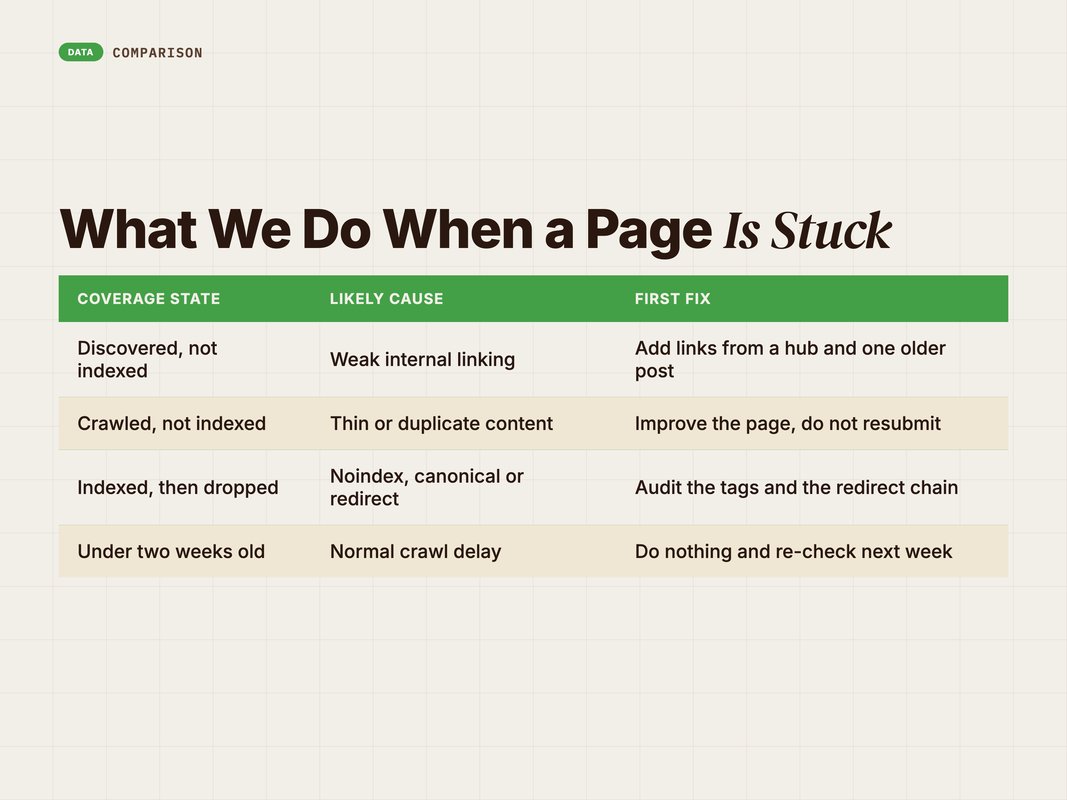
Discovered, not indexed. Google knows the URL exists but has not crawled it. That is nearly always a priority signal.
The fix is internal links. Add the page to a hub, a related-posts block and one relevant older post. Then check the sitemap actually lists it.
Crawled, not indexed. Google looked and passed. This one stings, because it is a quality judgement.
Do not resubmit. Improve the page instead. The usual causes are simple. Thin coverage of the topic. A near-duplicate angle to an older post. Or a page that answers nothing anyone searched for.
Indexed, then dropped. The page worked and stopped working. Check for an accidental noindex, a canonical pointing elsewhere, or a redirect added during a site change.
There is a fourth case worth naming. Sometimes the page is fine and Google is slow. If a page is under two weeks old and everything else looks healthy, do nothing.
Patience is a legitimate action. Resubmitting daily is not, and it wastes quota you will want later.
We work the list weekly, not daily. Daily creates busywork. Weekly gives Google time to act between passes.
Q: How many stuck pages is normal?
A: On a healthy site, a small share of recent posts and almost nothing older. If a quarter of your library is stuck, the problem is site-level, not page-level.
How We Run This for Clients
We build this once per brand and leave it running. It is a small part of a bigger habit.
YARD is an AI-first growth marketing agency. We run performance marketing, LLM SEO, AI creative and AI funnels for D2C and B2B brands. Technical SEO plumbing like this sits underneath the content work, not beside it.
In practice that means three things.
The indexing table lives in the same base as the content calendar. So a post's status is visible from the row that produced it, not in a separate tool nobody opens.
The workflow reports only exceptions. A daily email listing every indexed page trains people to ignore it. A weekly list of stuck pages does not.
And we treat the output as a content signal, not just a technical one. Pages that get crawled and dropped are usually telling you something about the page, not the crawler.
If you are publishing steadily and nobody can tell you which posts are actually indexed, that gap is worth closing. It is an afternoon of work and it pays back on the first stuck page you catch. For the wider reporting setup, see Google Search Console + AI: Automated SEO Reporting Guide.
The Short Version
You cannot force Google to index a page. You can find out fast when it has not.
Build a daily loop. Read the sitemap, compare it to a table you own, check unknown and unresolved URLs against the URL Inspection API. Write the verdict back with a date.
Respect the limits. The Indexing API is not for blog posts. The inspection quota is 2,000 a day. Stop re-checking pages that already passed.
Keep the code deterministic and put the model on the analysis end. Clusters of failures are where the real insight lives.
Then act on what it finds. Discovered but not crawled is a linking problem. Crawled but not indexed is usually a content problem.
Want this built into your stack alongside the content pipeline? Talk to the YARD team. We will scope it against your CMS and your publishing volume.
FAQ
Q: Can you force Google to index a page?
A: No. You can only make a page easy to find, easy to crawl and worth keeping. Sitemaps and inspection requests are hints. Google still decides.
Q: What does the GSC URL Inspection API do?
A: It returns Google's current index status for one URL at a time. You get a verdict, a coverage state and crawl details. The quota is 2,000 calls per property per day.
Q: Does the Google Indexing API work for blog posts?
A: Officially no. Google documents the Indexing API for JobPosting and BroadcastEvent pages only. Do not build a strategy that depends on it for normal content.
Q: Why put Airtable in the middle?
A: Because you need memory between runs. A table gives you last-checked dates, status history and a place to stop re-checking pages that are already indexed.
Q: How long should indexing take for a new blog?
A: Days to weeks, and it varies by site. The useful question is not the average. It is which of your pages are stuck, and this workflow answers that daily.
Q: Do I need Claude to run this?
A: Not for the pipeline itself, which is plain HTTP and JavaScript. Claude is where the work is: writing the nodes, the parsing code and the fix list from the results.
Insights from Our Experts
Explore our latest articles on digital marketing strategies.