

For two years, AI agents could read the open web.
That sounds useful. Mostly it was not.
Think about where your team actually spends the day. Ads Manager. Analytics. Search Console. The CMS. The Shopify admin. The client's vendor portal. The invoicing tool. The applicant tracker.
Every one of those sits behind a sign-in screen. An agent that stops there is a research assistant.
On August 25, 2026, that changed. OpenAI shipped authenticated browsing in ChatGPT Work. The agent can now finish jobs on sites you have signed in to.
Here is what actually shipped, the detail most coverage will get wrong, and the access policy to write before anyone tries it.
What OpenAI actually shipped
ChatGPT Work's browser can now complete tasks on some websites that need you to sign in. It works on web and on mobile.
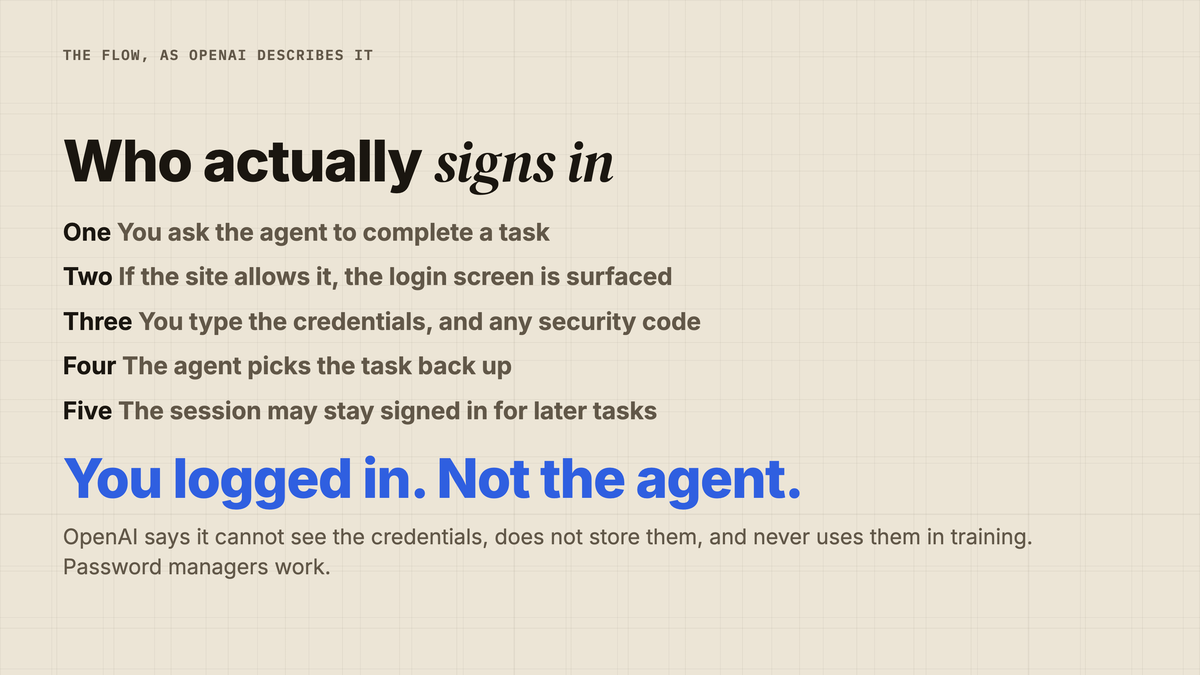
The flow is simple. You ask for a job. If the site allows it, ChatGPT shows you the login screen. You type your details. You enter a security code if one is needed. Then the agent carries on.
Password managers work.
OpenAI is clear on what it does not see.
In its own words, ChatGPT "cannot see your username or password". They are "never seen by the model or used in model training". And it "does not store your username or passwords".
You can wipe the history at any time, for one site or all of them, from Settings, Cloud browser, Browser data.
Q: Does ChatGPT log in for me?
A: No. You do the logging in, inside its browser. The agent picks up after you are through the door.
The detail most coverage will get wrong
Read that flow again, because the important line is easy to skim past.
OpenAI says your session "may remain signed in for future tasks, so you don't have to log in again every time."
So this is not a stolen password story. It is not a safe one either.
You are leaving a live, logged-in session standing, inside a browser that runs on OpenAI's machines, not yours.
That is a third thing. It is a delegated session.
The right mental model is not "I gave a tool my password". It is "I gave a contractor a key, and the key still works tomorrow."
Which is fine. Agencies hand contractors access every week. They just do it with a named account, a scope, and an end date.
Quick Facts: Authenticated Browsing in ChatGPT Work
- Shipped 25 August 2026, on web and mobile — (Source: OpenAI, 2026 — ChatGPT release notes)
- You enter the credentials yourself; ChatGPT cannot see or store them — (Source: OpenAI, 2026 — ChatGPT release notes)
- Sessions may stay signed in for later tasks — (Source: OpenAI, 2026 — ChatGPT release notes)
- Available on Plus and Pro plans — (Source: OpenAI, 2026 — ChatGPT release notes)
- Confirmation is required only before "consequential actions, such as completing a reservation or payment" — (Source: OpenAI, 2026 — ChatGPT release notes)
What this unlocks for a marketing team
The honest answer is not "everything". It is one specific category, and it is bigger than it sounds.
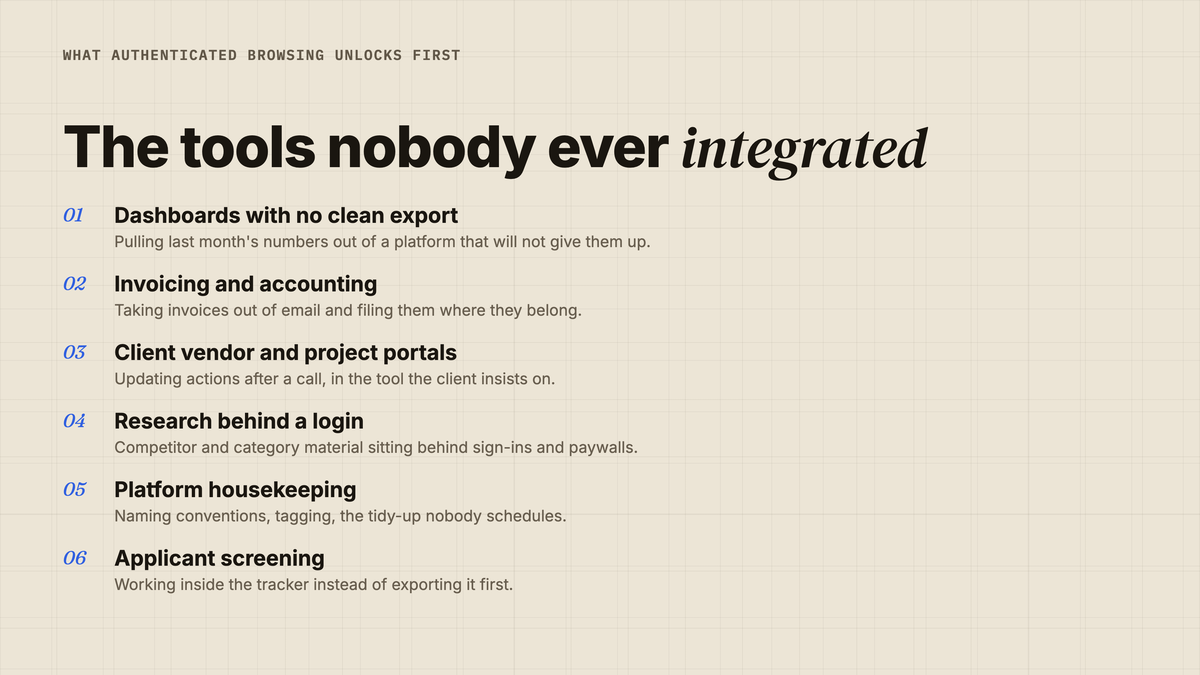
The pattern is the tool with no usable API.
Most teams can name a few without thinking. The reporting platform that will not export cleanly. The portal a client insists on. The accounting tool nobody has time to integrate.
Nobody ever built an integration for those, because the job was too small to justify a developer and too big to enjoy.
That is exactly the gap an agent behind a login fills.
Q: What should we automate first?
A: A read-only job. Pulling last month's numbers out of a dashboard that will not export properly. No spend, no publishing, no customer data.
What OpenAI itself suggests
The examples in OpenAI's own announcement tell you who this is aimed at. Several are squarely small-business and marketing jobs.
Analysing a recent ad campaign. Taking invoices out of email and filing them in accounting software. Adding action items to a vendor portal after a client call. Finding candidates with specific experience and drafting outreach. Filling in permit applications.
Read that list as a product signal. This is being pitched at the operator, not the developer.
There was a second change the same day, and it matters more than it looks. Scheduled tasks can now be triggered by webhooks — a new Gmail message, a Slack message, a GitHub pull request.
Put the two together. An agent that reacts to an event, and can then work behind a login.
That is the beginning of unattended work, not just assisted work.
What a normal week looks like with this
Take a small agency running six client accounts.
Monday morning is reporting. Someone opens six dashboards. They copy the same nine numbers out of each one. They paste them into a deck. It takes most of the morning, every week, forever.
Two of those six platforms have no clean export. That is why nobody has ever automated it.
Now the agent does the copying. A person checks the numbers and writes the commentary, which is the only part a client pays for anyway.
Tuesday is invoices. They arrive by email, in five formats, and get filed by hand.
Wednesday is portals. Two clients insist on their own project tool. Someone logs in and types up the actions from yesterday's call.
None of this is strategy. All of it is somebody's morning.
That is the honest scope of what shipped. Not smarter marketing. Fewer mornings lost to clicking.

It is the same shift we wrote about when a video model started taking finished documents as input. The tools are moving to where the work already sits.
Agent or integration? A quick way to decide
Not every job should go to an agent. Some should still be built properly.
The test is how often the job runs, and how much it costs when it goes wrong.
| The job | Send it to | Why |
|---|---|---|
| Runs weekly, no API exists | An agent behind a login | Nobody will ever fund the integration |
| Runs daily, API exists | A real integration | Cheaper, faster, and it leaves a clean log |
| Runs once, then never again | An agent | Not worth building anything |
| Spends money or publishes | A human, for now | The guardrail wording does not cover it |
| Touches customer records | A human, or a reviewed integration | Data terms, not convenience |
Most of what a marketing team should try sits in row one. Start there and nowhere else.
The mistake to avoid is using an agent as a permanent substitute for plumbing you should have built. It is a bridge for the jobs too small to plumb.
Q: Does this replace our integrations?
A: No. It covers the gap where an integration was never worth building, which for most marketing teams is a surprisingly long list.
The part nobody has solved: the audit trail
Here is the question to ask before you get excited.
When the agent changes something inside your ad account, whose name is on it?
The platform's change log records the session it was using. That session is yours.
So the log says a human did it. A person, at a company, who can be asked to explain the change.
That is not a reason to avoid this. It is a reason to be deliberate about which account signs in.
Never use a shared login. Use a named account, ideally one created for this purpose, so the trail means something six months later.
We made a related point when Anthropic committed to watermarking and file provenance. Knowing what a machine did, and proving it, is becoming its own discipline.
The guardrail is narrower than it sounds
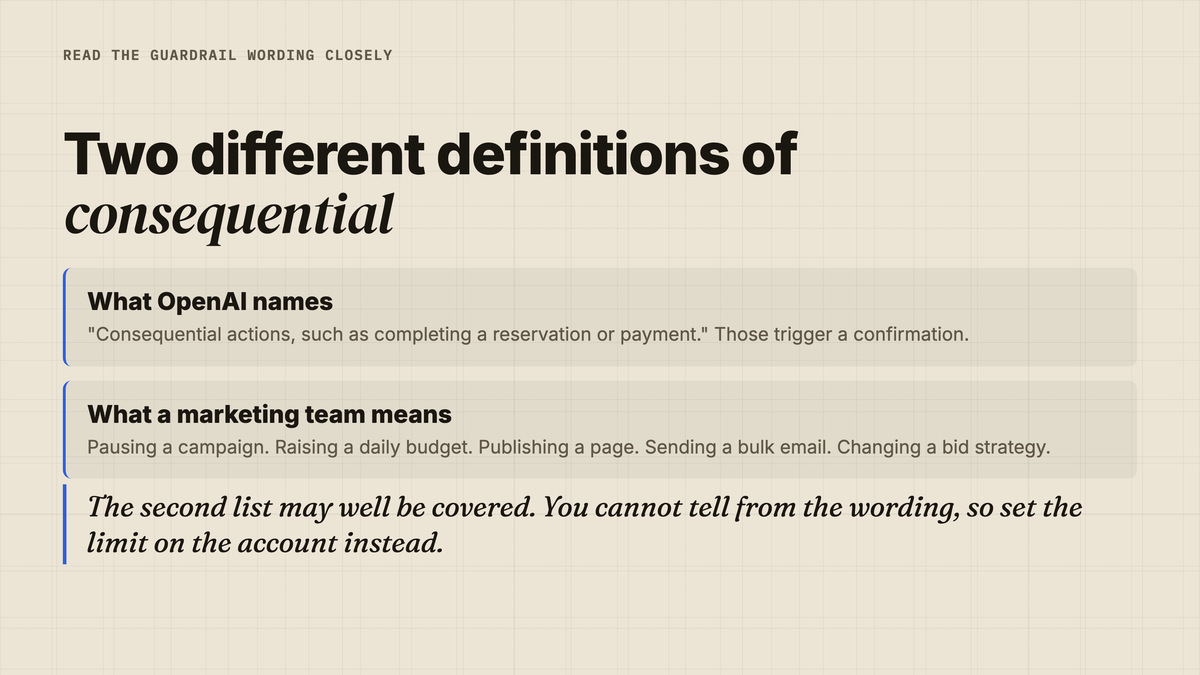
OpenAI does provide a brake. Its notes say ChatGPT Work "will always ask for confirmation before consequential actions, such as completing a reservation or payment".
Read the examples given. A reservation. A payment.
Now list the things a marketing team would call consequential. Pausing a campaign. Raising a daily budget. Publishing a page. Sending a bulk email. Changing a bid strategy.
None of those is a payment or a reservation.
They may well be covered. The point is that you cannot tell from the wording, and you should not assume.
So set the boundary yourself, on the account side, where you control it. Give the agent an account whose permissions already stop it doing the thing you fear.
Q: Can we let it into an ad account?
A: Only with a named, permission-limited user, and only after a read-only trial. Platform automation terms are your responsibility, not OpenAI's.
What this does not do
It is not on every site. OpenAI says "some websites". The site has to allow it.
It is not on every plan. The release notes list Plus and Pro.
It is not running on your machine. This is OpenAI's cloud browser. The standing session lives on their infrastructure.
It is not a security review. Your client's data terms still apply, and so does two-factor policy.
It is not new capability, exactly. ChatGPT Work already shipped finished deliverables in July. What changed is the surface it can reach.
A two-week rollout that will not scare anyone
You do not need a policy document to begin. You need one job and one account.
- List every tool your team uses that has no usable export or API.
- Pick the dullest read-only job on that list. Reporting, usually.
- Create a named account for the agent. Never reuse a shared login.
- Give that account the lowest permission level that lets the job finish.
- Run the job once, watching the whole way through.
- Compare the output against the version a human made last month.
If it matches, run it unattended the following week. If it does not, you have lost an afternoon and learned something specific.
Only after that should you discuss anything that spends money.
The access policy to write this week
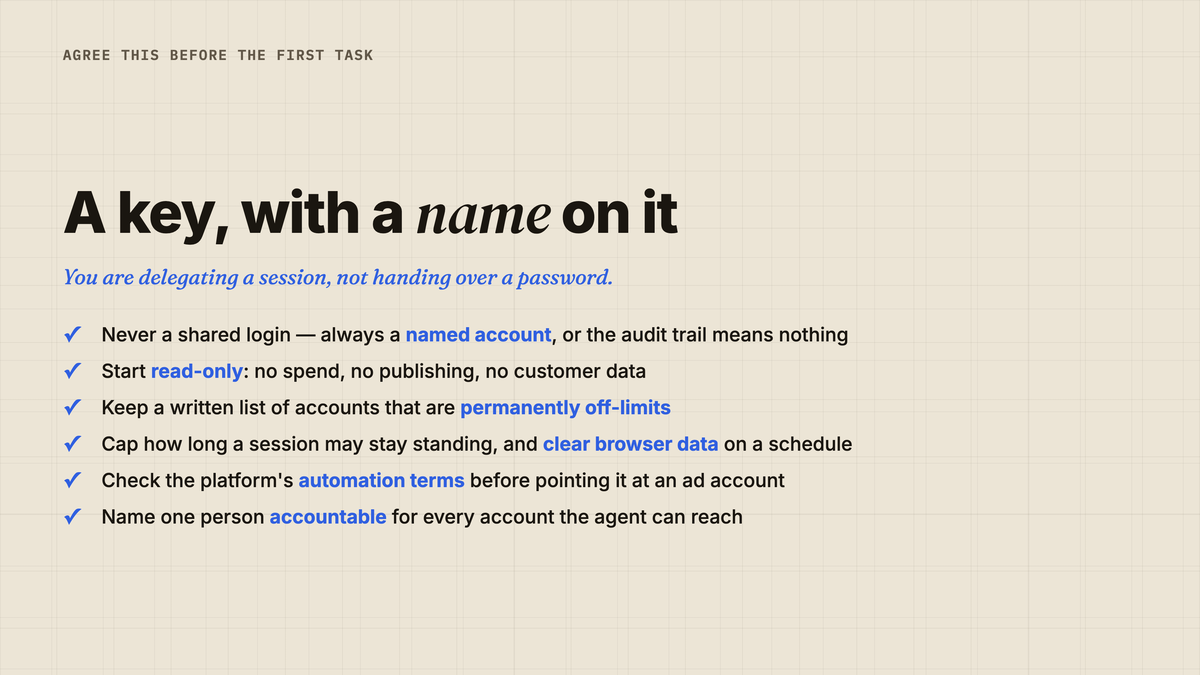
That first rule is the one teams break immediately, because the shared login is the one everybody already knows.
It is also the one that makes everything else pointless. If four people share an account, the log tells you nothing, and no policy you write on top of it will hold.
Fixing that takes twenty minutes and one new user. Do it before the first task, not after the first incident.
Do not start there. A shared login turns every agent action into an unanswerable question.
The YARD take
The interesting thing here is not that an agent can click a button. It is which buttons it can now reach.
Marketing runs on a dozen tools that were never built to talk to each other. The glue has always been a person, clicking through the same eight screens every Monday.
That glue is what is being automated now. Not the strategy. Not the creative. The clicking.
Which is valuable, and boring, and exactly the kind of thing that quietly gives a team back a day a week.
But it arrives with an accountability gap nobody has closed. If you take one thing from this, take the named account.
At YARD we build AI workflow pipelines for brands, so we spend a lot of time on the unglamorous half of this. What an agent may touch. What it may never touch. Who answers for it. Want that mapped against your own stack? That is the work we do.
FAQ
What changed in ChatGPT Work? Its browser can now complete tasks on some websites that require you to sign in, on both web and mobile. It shipped on 25 August 2026.
Does ChatGPT see my password? No. You enter your credentials yourself in the login screen it surfaces. OpenAI says they are never seen by the model, not used in training, and not stored.
Does it stay logged in? Yes. OpenAI says your session may remain signed in for future tasks, so you do not have to log in each time.
Which plans have it? OpenAI's release notes list Plus and Pro.
Is it safe to use on an ad account? Only with a named, permission-limited user, and only after a read-only trial. The platform's change log will attribute actions to the human whose session was used.
Will it ask before doing something risky? OpenAI says it asks before consequential actions, giving reservations and payments as the examples. Marketing actions like pausing a campaign are not named, so set limits on the account instead.
What should we try first? A read-only job in a tool with no usable API. Pull last month's numbers out of a dashboard that will not export cleanly.
Sources
- OpenAI — ChatGPT release notes (25 August 2026 entry; primary source for the mechanic, plans and guardrail wording)
- OpenAI — @ChatGPT announcement post (25 August 2026; the example task list)
- Neowin — ChatGPT Work can now log in to websites and complete tasks for you (August 2026)
Insights from Our Experts
Explore our latest articles on digital marketing strategies.