

MCP servers are the quiet upgrade marketing teams have been waiting for.
Every marketer knows the pain. Data sits in ten tools. Reports take half a Monday. The AI you bought is great at writing but blind to your own numbers. That is what MCP servers fix.
This is a complete guide to MCP servers for marketing teams. What an MCP is. The four core types. How it compares to Zapier and APIs. The five-step setup loop. The MCPs to add first. The pitfalls to avoid.
By the end, you will have a clear picture of what to wire up next week and what to skip.
What Is an MCP Server, Really?
MCP stands for Model Context Protocol. It is an open standard introduced by Anthropic in late 2024.
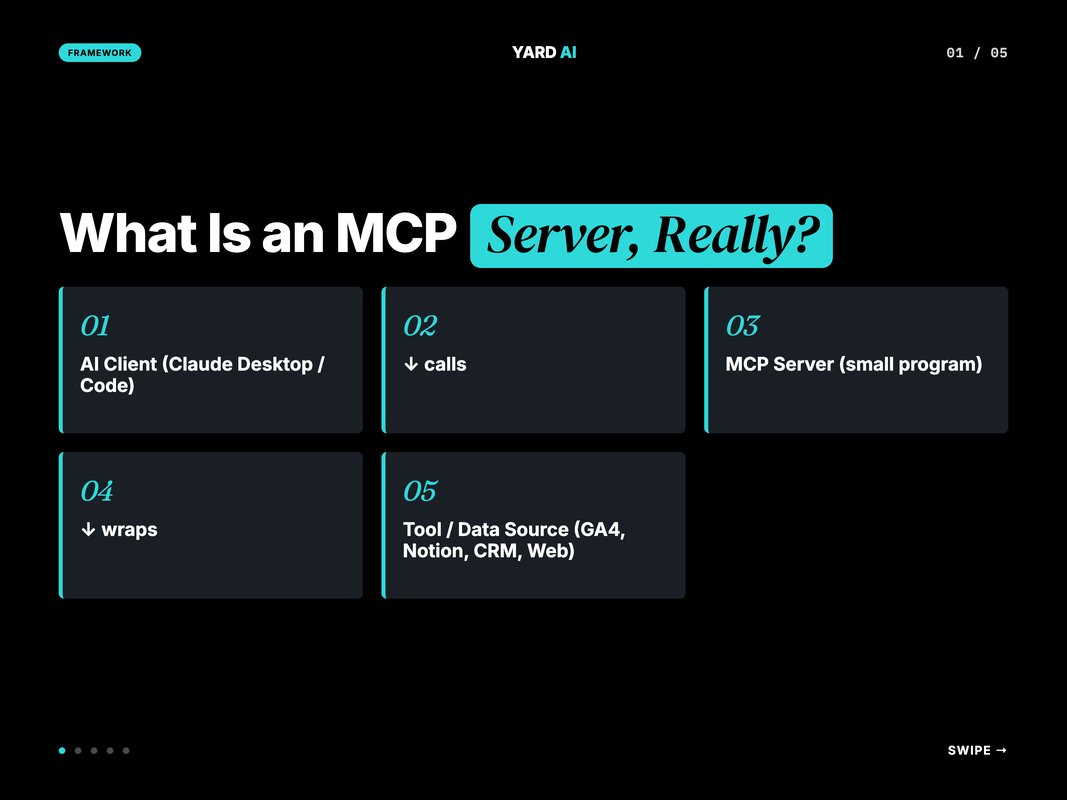
An MCP server is a small program that exposes a tool to an AI client. The AI client can be Claude Desktop, Claude Code, an IDE plugin, or a custom agent. The MCP server can wrap any data source — a SaaS API, a database, a file system, a website.
When the AI needs the tool, it calls the MCP. The MCP runs the action. The result flows back into the AI's context.
Anthropic frames MCP as "an open standard for connecting AI assistants to the systems where data lives." (Source: Anthropic, 2024 — modelcontextprotocol.io)
The protocol is open. The reference implementations are open-source. The catalog of community MCPs is growing fast. The official directory now lists hundreds of servers across categories. (Source: Model Context Protocol, 2025 — modelcontextprotocol.io/servers)
Q: Is MCP only for Claude?
A: It started with Anthropic but is now multi-vendor. OpenAI, Cline, Continue, and several IDE makers have shipped or signalled MCP support. The protocol is open. The lock-in is low. Treat it as a portable integration layer, not a Claude-only feature.
Why MCPs Matter for Marketing Teams
Marketers do not need yet another tool. Marketers need fewer context switches.
Quick Facts: AI adoption in marketing today
- 73 percent of marketing teams now use AI as part of weekly workflow (Source: Gartner, 2024 — gartner.com).
- McKinsey finds AI-assisted marketing teams ship 3 to 4x more output per FTE (Source: McKinsey, 2024 — mckinsey.com).
- Forrester reports marketers spend 30 to 40 percent of weekly time on manual data pulls (Source: Forrester, 2024 — forrester.com).
- Anthropic positions MCP as the open standard that closes the AI-to-data gap (Source: Anthropic, 2024 — modelcontextprotocol.io).
MCPs target the manual data pull layer. The thirty-percent slice. The Monday morning ritual where someone exports CSVs from four dashboards and pastes them into a single sheet.
With MCP, that ritual disappears. The AI pulls the data when needed. The marketer reviews. The output ships.
The second value is composition. One prompt can call three MCPs in sequence. Pull GA4, pull Search Console, write to Notion. No glue code. No second tool. The AI orchestrates.
Q: Will MCPs replace dashboards?
A: Not soon. Dashboards remain great for at-a-glance views. MCPs are great for ad hoc questions and recurring reports. The pattern most teams settle on is dashboards for the daily glance, MCPs for everything else.
The Four Core Types of Marketing MCPs
Most marketing MCPs fall into one of four buckets. Knowing the bucket helps you sequence what to install.
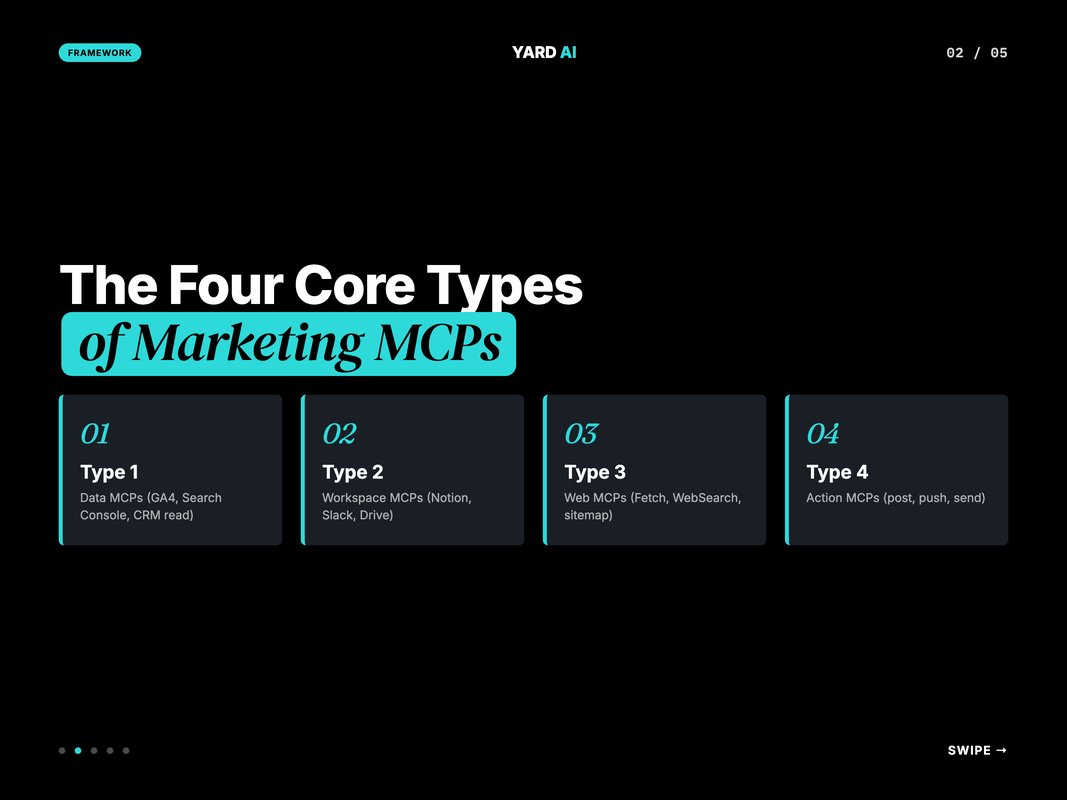
Type 1 — Data MCPs. Read-only access to a marketing data source. GA4, Search Console, Meta Ads, Google Ads, Ahrefs, SEMrush, HubSpot CRM. The bread and butter. Most weekly reports run on these.
Type 2 — Workspace MCPs. Read and write access to where the team works. Notion, Slack, Google Drive, Linear, Airtable, Asana. The places where outputs land.
Type 3 — Web MCPs. Tools that read the open web. Fetch, WebSearch, browser automation, sitemap parsers, llms.txt readers. The research layer.
Type 4 — Action MCPs. Tools that change something live. Post to social, push a campaign, update a CMS, send an email. The riskiest layer. Use scoped tokens. Test in sandbox first.
A marketing stack with one MCP from each type covers most weekly work. Most teams overweight type 1 and underweight type 4. Type 4 is where the leverage compounds.
The reason for that is simple. Reading data is useful. Acting on data is the ten-x lever. A workflow that pulls Search Console data and writes a Notion brief saves an hour. A workflow that pulls Search Console data and pushes the brief draft into the CMS saves a half-day. The action layer is where the time stops being incremental.
Most teams resist action MCPs out of caution. The caution is correct. The fix is not to skip the type. The fix is to scope the token, sandbox the workflow, and require human review before the live push. With those guardrails, type 4 ships safely.
MCPs vs Zapier vs APIs — When to Use What
Marketers mix these three up all the time. They do different jobs. The best stacks use all three.
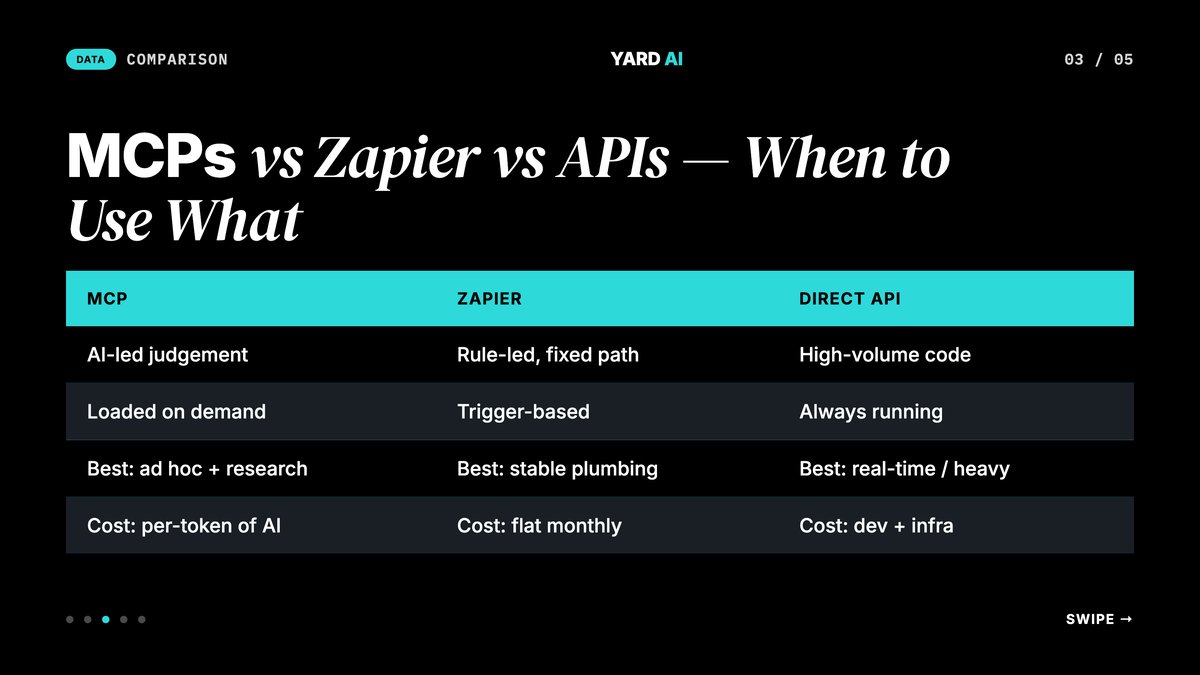
MCP wins when the workflow is judgement-led. The AI decides which tool to call, when, and how. Ad hoc reporting. Mid-task data lookups. Multi-step research that branches based on what it finds.
Zapier wins when the workflow is rule-led and stable. Fire on event, run fixed path. New form submission goes to CRM. New blog publishes goes to Slack. No judgement needed.
Direct APIs win when the workflow is high-volume or latency-sensitive. A real-time bidding system, a programmatic ad pipeline, a data warehouse sync. Code lives in your stack, not in an AI prompt.
A typical performance marketing team will run all three. Three or four MCPs for daily judgement work. Ten to twenty Zaps for the rule-led plumbing. A handful of direct API jobs for the heavy data flows.
Q: Will MCPs eat Zapier?
A: They will overlap. Many tasks that ran as Zaps will move to MCP-orchestrated prompts because the AI handles the judgement step. Zapier itself is moving toward AI-native workflows. The boundary will blur. Both will live.
The 5-Step Setup Loop for Marketing MCPs
Adding MCPs to a marketing stack follows a tight loop. Five steps. Most teams ship their first MCP in a single afternoon.
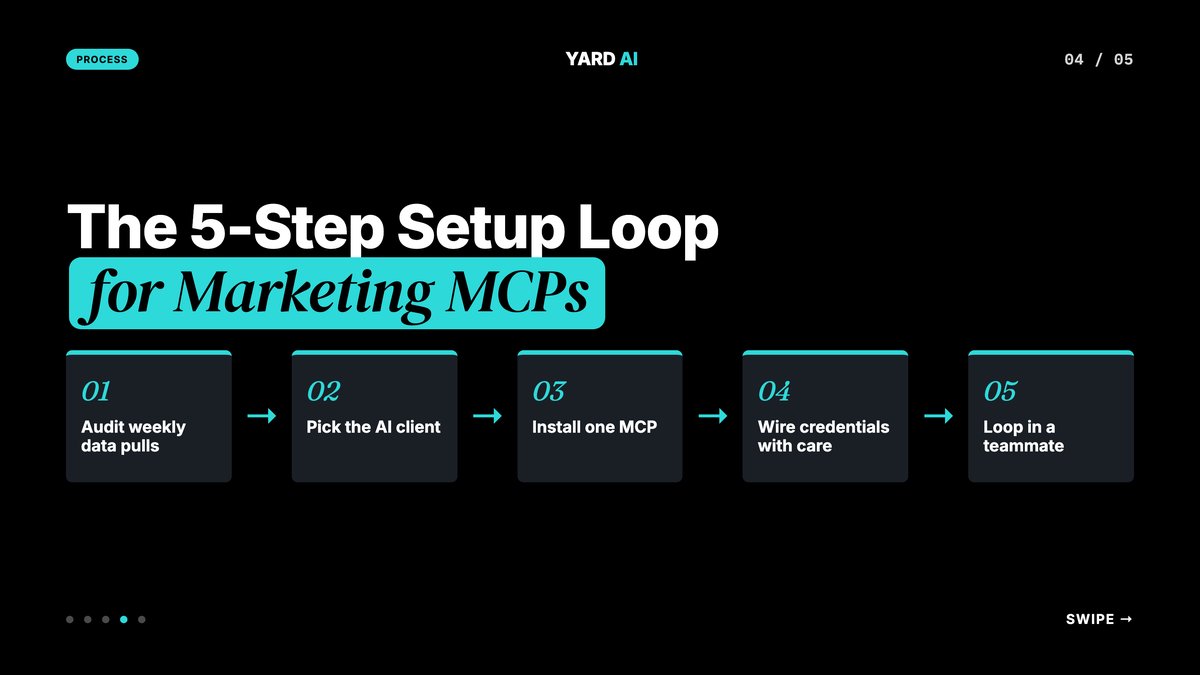
Step 1 — Audit your weekly data pulls. List every dashboard you copy from on a Monday. List every tool you paste into. The overlap of those two lists is your MCP wishlist.
Step 2 — Pick the AI client. Claude Desktop is the simplest. Claude Code is the most powerful. Cursor and other IDEs are the choice for engineering-led teams. Pick one. Standardise.
Step 3 — Install one MCP. Start with a low-stakes data MCP. Search Console or a Notion read-only MCP. Run a real query. Confirm the output. Watch the loop.
Step 4 — Wire credentials with care. Use scoped tokens. Use a workspace, not your main account. Rotate every 90 days. Log every call. Treat MCP credentials with the same care as production API keys.
Step 5 — Loop in a teammate. Show one colleague the workflow. Watch them try. Note the friction. Patch the install steps. Most MCP friction is documentation friction, not protocol friction.
That is the loop. One MCP a week. Six weeks in, the team's Monday ritual is unrecognisable.
The cadence matters. Teams that try to install eight MCPs on day one get noisy results. The AI client picks the wrong tool. The team loses trust in the stack. One MCP a week lets the team learn each tool's shape before adding the next one.
The other quiet payoff of the loop is documentation. Every install ends with a five-line README. After six weeks the team has a small internal cookbook of what each MCP does and how it connects. That cookbook is what onboards the next teammate.
The Top MCPs Marketing Teams Should Add First
The catalog is wide. Most teams need eight to twelve. Here is the priority order most marketing teams settle on.
The starter pack:
- A Search Console MCP for keyword and click data. (Reference: official servers list — modelcontextprotocol.io/servers).
- A GA4 MCP for traffic and conversion data.
- A Slack or Notion MCP for sending outputs to the team.
- A WebSearch MCP for live research.
- A Fetch MCP for raw page content.
- A Filesystem MCP for local files and brand assets.
- A CRM MCP for HubSpot, Salesforce, or your platform.
- A Meta Ads or Google Ads MCP for paid data and creative QA.
- An Airtable or Sheets MCP for the team's working sheet.
- A Linear or Asana MCP for the marketing roadmap.
Ten MCPs cover the bulk of marketing work. Add specialised ones (Ahrefs, SEMrush, Mixpanel, Amplitude) only when the role demands it.
Common Pitfalls (and Fixes)
Most teams hit the same five problems on their first MCP install. The fixes are short. Skip them and the second install fails for the same reason.
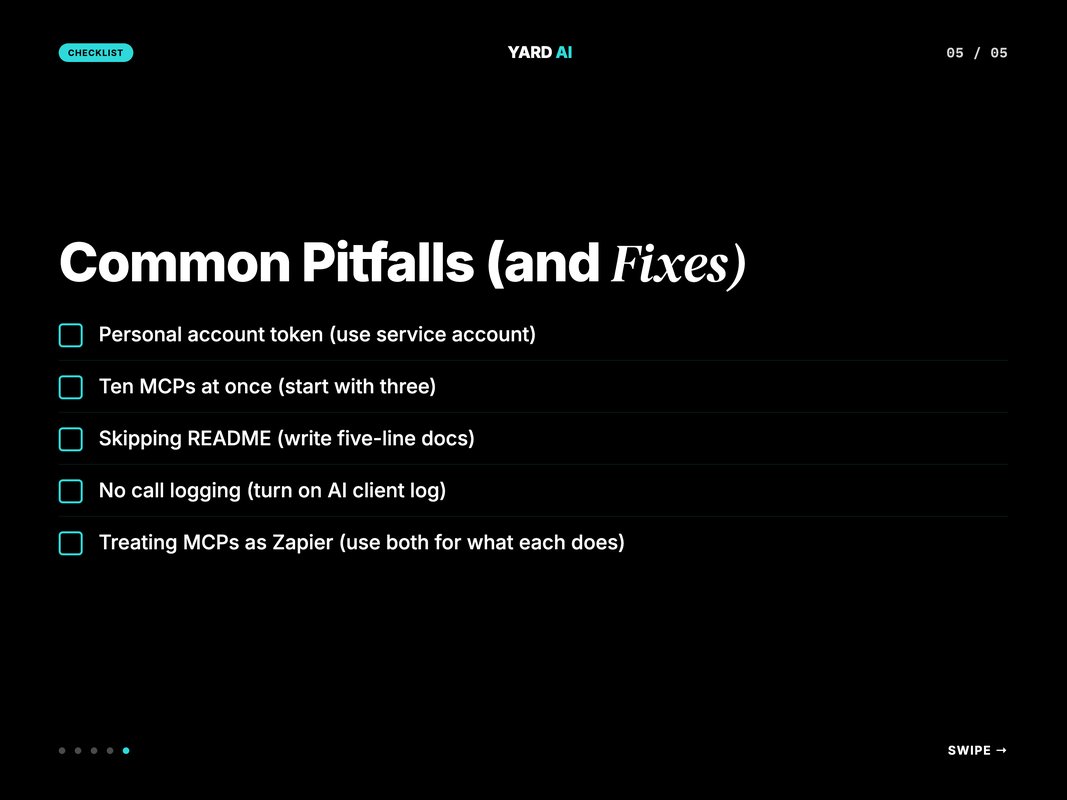
The 5 most common pitfalls:
- Using a personal account token for a team MCP. The token expires when the person leaves. Use a service account or a scoped workspace token.
- Installing ten MCPs at once. The AI client gets confused on which to call. Start with three. Add as needed.
- Skipping the documentation step. The next teammate does not know how to run it. Write a five-line README beside every MCP.
- No call logging. Something breaks and there is no trail. Turn on the AI client log. Save it for thirty days.
- Treating MCPs as Zapier replacements. They are not. Use Zapier for rule-led automation. Use MCP for judgement-led work.
Fix these five and the stack stays clean as the team grows.
Q: What is the fastest way to get unstuck on an MCP install?
A: Read the AI client log. The error message is almost always there. Most install issues are credentials, port conflicts, or a missing JSON config flag. Rarely the protocol itself.
The community around MCP is also worth using. The official directory has a Discord. Most popular MCPs have GitHub issues with active maintainers. A two-line question on the right thread saves an hour of debugging in most cases. New MCPs ship every week, so the answer is often "use the new version".
A 7-Item Pre-Adoption Checklist
Before adding a new MCP to the team stack, run this short check. We catch most v1 problems here.
The pre-adoption checklist:
- The MCP is published on the official directory or a trusted vendor site.
- Source code is open or signed by a known vendor.
- A scoped token can run the workflow. No root credentials needed.
- The token can be rotated without breaking the install.
- The MCP supports the action set the team actually needs.
- A teammate not in the install loop can read the README and run it.
- The MCP has been used by at least one other team or community in production.
Pass all seven and the MCP is safe to ship. Miss two or more and pilot it on personal accounts first.
The check feels heavy on the first MCP. It feels light by the fifth. The teams that hold this discipline do not get the late-night call about a token leak or a missing log. The teams that skip it do.
How YARD Uses MCPs in Client Work
YARD is a digital marketing agency built around AI-native workflows. We run paid, SEO, and content for B2B and DTC brands. MCPs are part of the core workflow on every account.
The way we use MCPs is straightforward. Search Console plus GA4 MCPs feed the weekly SEO read. Meta and Google Ads MCPs feed the paid pacing checks. Notion and Airtable MCPs are where outputs land. WebSearch and Fetch handle the research layer.
The win is consistency. Every Monday produces the same shape of report. Every audit pulls the same checks. Every week's findings land in the same Notion spot. Clients see the same loop applied to their account.
The other win is speed. A question that used to take an hour now takes a few minutes. A Monday report that used to take half a day now takes thirty minutes. The team gets more time on the judgement work — strategy, creative review, client conversation. The data layer fades into the background where it belongs.
If you want to see how an MCP-led marketing stack runs in production, that is what we wire for clients. The first wiring takes a week. The compounding starts in month one. By month three, the team owns it.
You can see how we work with brands at yardagency.ai. The YARD Way is built around live data, not stale exports.
Conclusion — Install One MCP This Week
MCP servers are the cheapest leverage in modern marketing. The cost is hours. The payback is weeks. The compound is the next year of your team's time.
You do not need a new platform. You do not need a developer hire. You need a small protocol, a few credentials, and the patience to add one MCP a week.
Pick the data source you copy from every Monday. Find the matching MCP. Install it. Run one real query.
Then add the next one. And the one after that. Six weeks in, the Monday morning data pull has disappeared.
The teams that move fastest on this are not the most technical. They are the most disciplined. They name a single owner for the stack. They keep the MCP count under twelve. They rotate tokens on a calendar. They review the call log every other Monday. The discipline compounds. The data tax disappears.
If you want help thinking through which MCPs to add first, book a 30-minute call at yardagency.ai. We will pick three MCP candidates from your weekly work and rank them by hours saved.
FAQ
Q: What is an MCP server in simple terms?
A: MCP stands for Model Context Protocol. An MCP server is a small program that gives an AI like Claude live access to a tool or a data source. Read GA4. Write to Notion. Query Search Console. The AI calls the MCP. The MCP does the work.
Q: How is an MCP server different from a Zapier zap?
A: A Zap fires on a trigger and runs a fixed path. An MCP is a live tool the AI picks up only when needed. The AI decides when to call. The AI shapes the request. MCPs win when the workflow is judgement-led. Zaps win when the workflow is rule-led.
Q: Do I need to code to use MCP servers?
A: No, not for most marketing use cases. Most popular MCPs ship as one-line installs. Claude Desktop, Claude Code, and a few other clients now configure MCPs through a simple JSON file. Building a custom MCP is a code job. Using an existing one is not.
Q: Which MCP servers should marketing teams add first?
A: Three to start. A Search Console or GA4 MCP for SEO data. A Slack or Notion MCP for output. A WebSearch or Fetch MCP for live research. Add a CRM MCP next. That four-MCP base covers 70 percent of weekly marketing work.
Q: Are MCP servers safe for client data?
A: They are as safe as the credentials you give them. MCPs run locally or in a controlled host. They use the same tokens you would use elsewhere. Treat them with the same access discipline. Use scoped tokens. Rotate them. Log every call.
Q: How much does it cost to run MCP servers?
A: Most popular MCPs are free and open-source. The cost is the AI subscription that calls them. A small marketing team can run a full MCP stack on a Claude Pro or Team plan with no extra spend. Heavy automation needs a Team or Enterprise plan.
Q: What is the future of MCP for marketing?
A: MCPs are becoming the default integration layer for AI tools. Anthropic, OpenAI, and others have signalled MCP support. Expect every major SaaS to ship an official MCP within a year. Marketing teams that build MCP fluency now will compound the lead.
Insights from Our Experts
Explore our latest articles on digital marketing strategies.