

A custom Claude Code skill is the cheapest leverage in modern marketing.
You write the playbook once. Claude runs it forever. The same SEO audit. The same blog brief. The same campaign QA. Same shape every time.
That is what custom Claude Code skills are for. Not flashy demos. Repeatable work. Done in minutes, not days.
This post shows how to build one. The anatomy. The five steps. The six skill patterns marketing teams reach for first. The traps. By the end, you can build your first skill before lunch.
What a Claude Code Skill Actually Is
A skill is a folder. Inside the folder sits a SKILL.md file. That file holds three things. The trigger. The steps. The output shape.
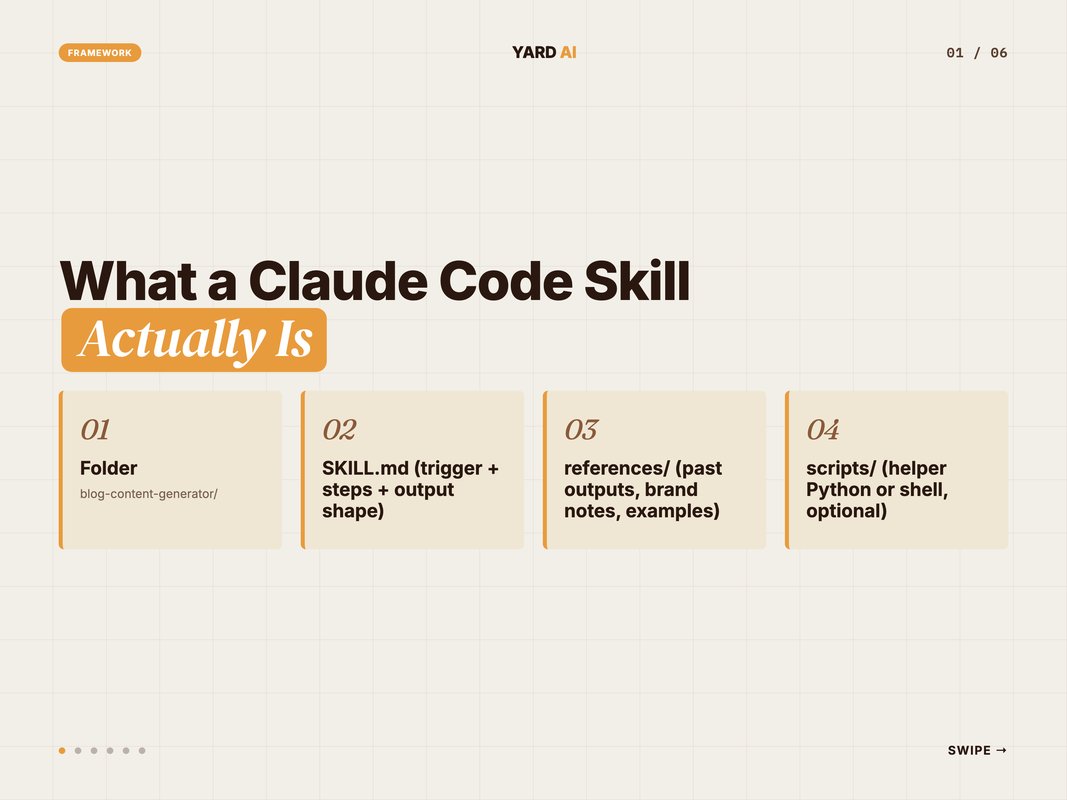
Claude reads the skill only when the request matches the trigger. The rest of the time, the skill is invisible.
That gating matters. A marketer can keep 40 skills on disk. Claude will load only the one that fits. No context bloat. No confusion. Just the right playbook at the right time.
Think of a skill the way you think of a lambda function. Small. Single purpose. Reused everywhere. The skill itself does no work until something calls it. The trigger is the call. The body is the function. The output is the return value.
You ship one skill the way you ship one recipe. You write the steps. You list the ingredients. You note the swaps. Anyone on the team can run it the same way next Tuesday. That is the whole point.
Anthropic ships skills as a first-class feature in Claude Code. The docs call them "modular, reusable expertise that Claude loads on demand." (Source: Anthropic, 2025 — docs.claude.com/en/docs/agents-and-tools/agent-skills)
Q: Is a skill the same as a prompt template?
A: No. A prompt template is a string. A skill is a folder. The folder can hold reference docs, helper scripts, and example outputs. Claude pulls only what each run needs. Templates can not do that.
When to Build a Skill (Decision Framework)
Not every task needs a skill. Most do not. Use this short test first.
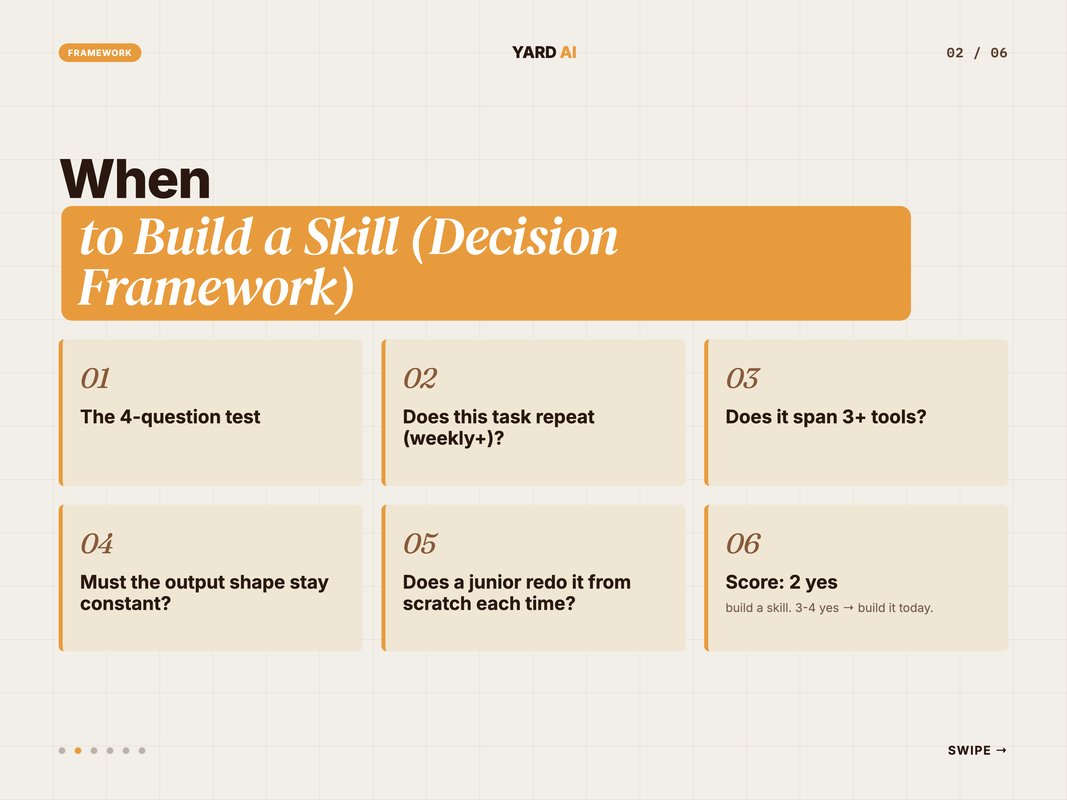
The 4-question test:
- Does this task repeat? At least once a week, ideally daily. If not, write a prompt and move on.
- Does it span more than three tools? Sheet plus Notion plus Slack plus a doc. That is skill territory. One tool tasks rarely earn a skill.
- Must the output shape stay constant? Same headers. Same fields. Same length. If yes, a skill locks the shape.
- Does a junior teammate redo it from scratch each time? That is dead time. A skill turns the redo into a one-line trigger.
Two yes answers — build a skill. Three or four — build it today.
Concrete examples help. Drafting one ad-hoc client memo each quarter is not skill work. Writing the same weekly status report from the same five sources every Monday is. Pulling Search Console data once for a pitch is not skill work. Pulling it every Friday with the same shape is.
The trick is to count repetitions, not feel them. Most marketers feel like every task is new. Most tasks are not. Pull a week of your calendar. Mark the repeats. The skill list will write itself.
Q: What if the task changes every time we run it?
A: Then it is not skill work yet. Use prompts. Watch the changes for two weeks. Often the "different every time" feel hides a steady core. Once that core shows up, skill it.
The 5-Step Skill-Building Process
This is the loop YARD runs every time we ship a new skill. Five steps. Two to four hours for v1.
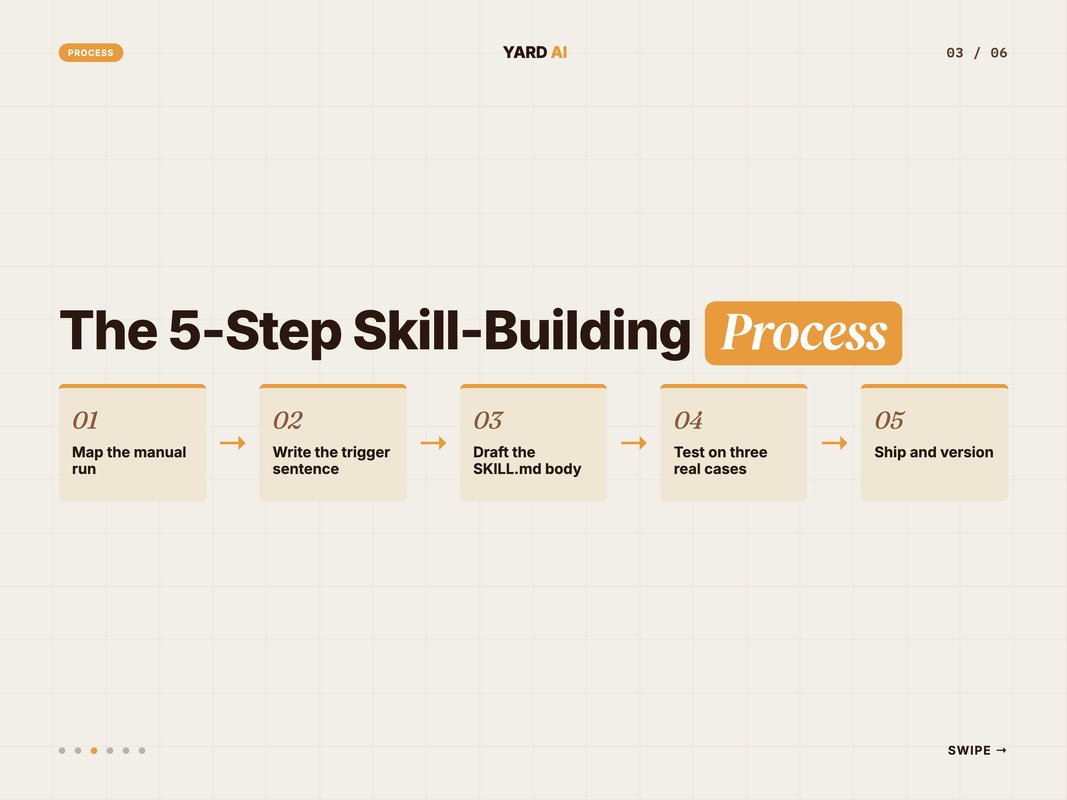
Step 1 — Map the manual run. Do the task by hand once. Note every click. Every tab. Every paste. Every decision. The gaps in your notes are where the skill will fail later.
Step 2 — Write the trigger sentence. One line that tells Claude when to fire the skill. Example: use this skill when the user asks to draft a Google Ads campaign brief. Specific verbs win. Generic triggers misfire.
Step 3 — Draft the SKILL.md body. The body is the playbook. Numbered steps. Inputs needed. Output shape. Edge cases. Aim for under 400 lines for v1.
Step 4 — Test on three real cases. Run the skill on three live tasks. Note the failures. Patch the SKILL.md. Re-run. Most skills need three rounds before they hold.
Step 5 — Ship and version. Move the folder to ~/.claude/skills/ or .claude/skills/ in the repo. Tag a v1 in the body. Track changes from there. Every revision earns a new version line.
That is the loop. Two to four hours. Then the skill earns its time back every week.
The first skill you ship feels slow. The second feels faster. By skill four you can draft a v1 over lunch. The mental model lands once you see your own work as a series of repeatable shapes. Once that frame clicks, every Monday morning has a skill in it.
Most teams that try and fail to build skills fail at step one. They skip the manual run. They jump to the SKILL.md. Then they wonder why Claude misses half the steps. Do the slow run first. Write what you actually do, not what you think you do.
Inside SKILL.md — The Anatomy
A skill is its SKILL.md. Get the file right and the skill works. Get it wrong and Claude guesses.
The minimum viable shape sits in the YAML frontmatter at the top of the file. That block is the contract between you and Claude.
---
name: weekly-status-report
description: Use this skill to compile the Monday client
 status report from GA4, Search Console, and the spend
 tracker. Triggers on phrases like "build this week's
 status doc" or "run the Monday report". Produces one
 Google Doc with the standard 5-section shape.
---
Below the frontmatter sits the playbook itself. Plain markdown. Numbered steps for what to do. Inputs the skill reads. Output shape. Edge cases. Most marketing skills land between 200 and 500 lines.
The frontmatter at the top is what Claude reads first. The description field is the trigger. Write it like an instruction, not a label. Verbs and concrete nouns beat vague summaries.
Q: How long should a SKILL.md be?
A: Aim for 200 to 600 lines for marketing skills. Below 200 and the skill is too thin. Above 600 and Claude struggles to keep the whole shape in mind. Split big skills into smaller chained skills instead.
Six Skill Patterns Marketing Teams Build Most
Skill choices vary by team. The set you build for paid will look different from the set you build for SEO. Across most marketing teams, six patterns show up again and again.
Quick Facts: AI adoption across marketing teams
- 73% of marketing teams report AI use as part of weekly workflow in 2025 (Source: Gartner, 2024 — gartner.com).
- McKinsey finds AI-assisted marketing teams ship 3 to 4x more content per FTE (Source: McKinsey, 2024 — mckinsey.com).
- Anthropic positions skills as "modular, reusable expertise" loaded on demand (Source: Anthropic, 2025 — docs.claude.com/en/docs/agents-and-tools/agent-skills).
The six patterns:
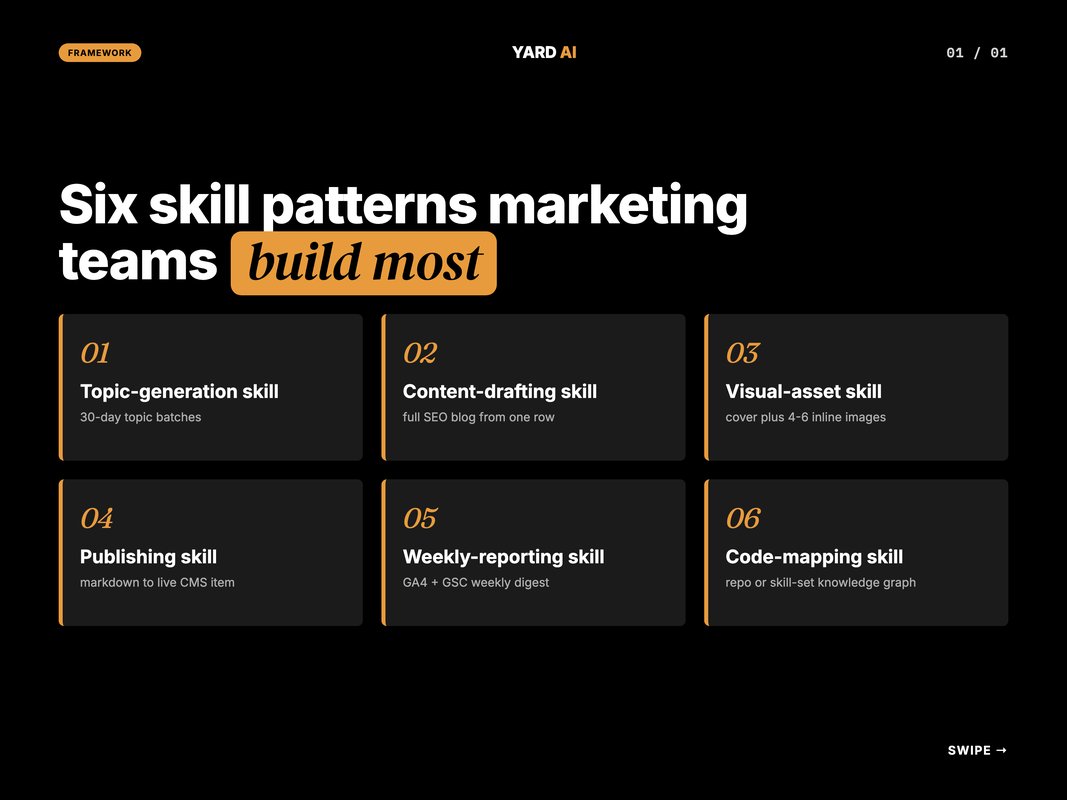
A topic-generation skill. Reads the content calendar. Picks the topic gaps. Writes a batch of titles, keywords, and pillars back to the calendar.
A content-drafting skill. Takes one calendar row. Drafts a full SEO blog with frontmatter, body, schema, and FAQ. Locks the readability target.
A visual-asset skill. Reads a visual direction block. Renders cover and inline images. Routes each slot to the right model based on type.
A publishing skill. Takes the final markdown. Re-hosts images on the CMS host. Pushes the live item. Logs the URL back to the calendar.
A weekly-reporting skill. Pulls GA4 and Search Console for the active accounts. Drops the numbers into the same sheet every Monday with the same shape.
A code-mapping skill. Maps a repo or a skill folder into a knowledge graph. Used to spot gaps and dead nodes before scaling the stack.
Six patterns is the floor, not the ceiling. Add a paid-audit skill, a brief generator, a CMS data-cleaner, an outreach drafter. Pick the one that matches your weekly load.
The maintenance is real once the stack grows. A skill drifts when the source data drifts. A new field shows up in the calendar. A new pillar lands. A model upgrade changes the output shape. Patch the SKILL.md the day you notice the drift. The cost of a small patch is minutes. The cost of a stale skill is a full bad output.
Keep a references/ folder beside each SKILL.md. Past outputs live there as ground truth. Brand tone notes live there. The five most recent live runs live there. Claude pulls from references/ only when needed. The folder is the skill's memory.
Q: How do you decide which task to skill first?
A: Rank every recurring task by hours per month and shape stability. Anything over 4 hours and stable in shape is a skill candidate. Ship one or two per month. After six months, the loop covers most of a team's repeat work.
Skills vs Agents vs MCPs — When to Use What
Marketers mix these three up all the time. They do different jobs. You will need all three eventually.
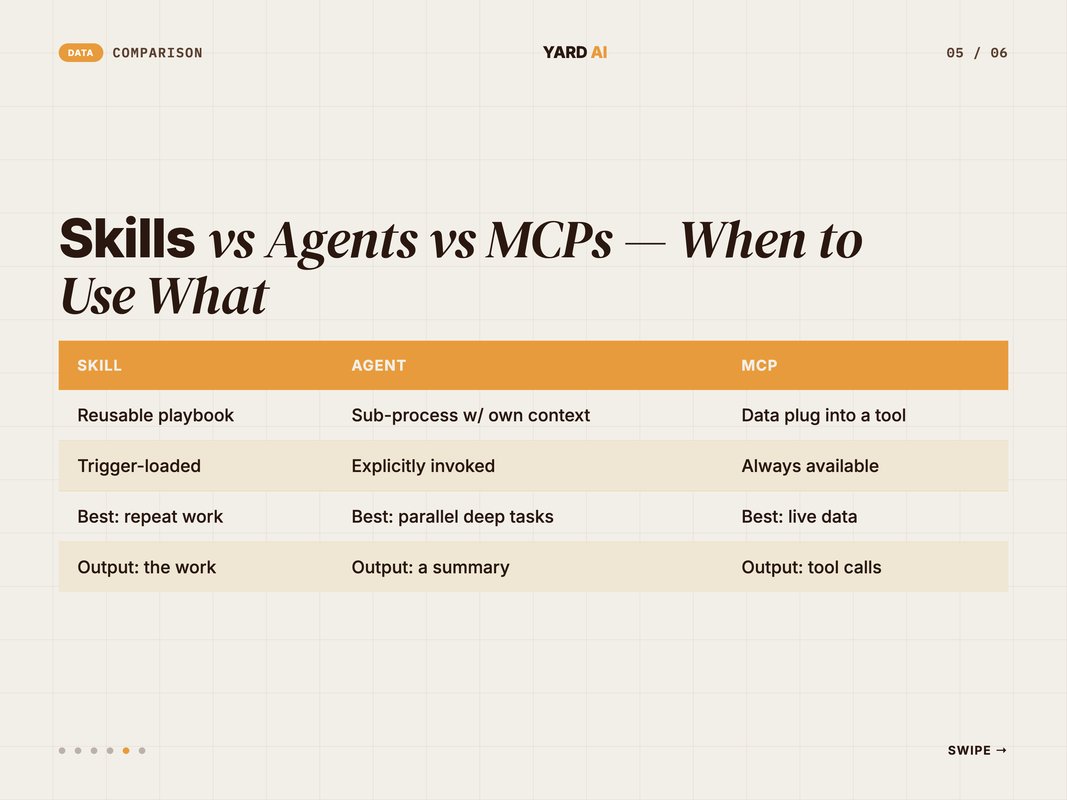
A skill is a reusable playbook. It lives in a SKILL.md folder. It loads when its trigger matches the request. The output is the work itself — a draft blog, a campaign brief, a finished report. Best for repeat work that needs the same shape every time.
An agent is a sub-process with its own context window. It runs side jobs in parallel. You invoke it explicitly from inside a skill or directly. It hands back a summary, not the raw work. Best for long parallel tasks like deep research, code review, or wide codebase searches.
An MCP is a data plug into an outside tool. It is always available once configured. It does not store know-how. It just gives Claude live access — read GA4, write Notion, post to Slack, query Search Console. Best when fresh external data or live writes matter.
Pick a skill when the playbook matters. Pick an agent when context size or parallel work matters. Pick an MCP when fresh external data matters.
Skills, agents, and MCPs sit at the heart of Claude Code's design. Anthropic frames them as the three primitives of agentic coding. (Source: Anthropic Claude Code docs, 2025 — docs.claude.com/en/docs/claude-code/overview)
Q: Can one skill use all three at once?
A: Yes. A content-drafting skill can fire as a skill, call a WebSearch MCP for live SERP data, and spawn a research agent for deep competitor analysis in the same run. The skill is the orchestrator. The MCP is the data layer. The agent is the side job.
Common Pitfalls (and Fixes)
The first three skills almost always fail in the same way. We have shipped enough of them now that we can name the traps.
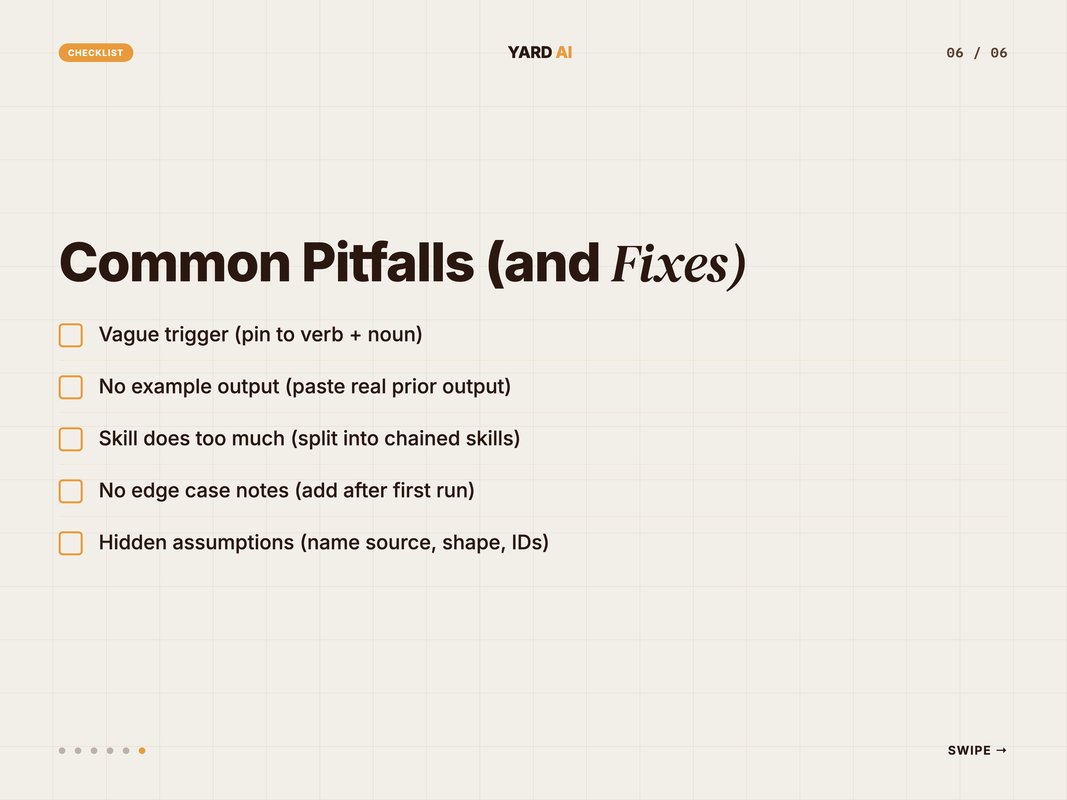
The 5 most common pitfalls:
- Vague trigger. A line like "use for marketing tasks" misfires. Pin it to a verb plus a noun. Use when the user asks to draft a Google Ads campaign brief is a clean trigger.
- No example output. Claude needs to see the shape. Paste a real prior output in the references folder. Skills with examples ship 2x faster.
- Skill does too much. A 1,200-line SKILL.md is a sign the skill should be three skills chained. Split early.
- No edge case notes. The first run reveals gaps. Add them to the SKILL.md before the next run, not after the third failure.
- Hidden assumptions. "Pulls the latest data" — from where? Name the source. Name the shape. Name the field IDs.
Fix these five and your first skill ships clean.
Q: What is the fastest way to debug a skill that misfires?
A: Read the SKILL.md aloud as if you were Claude. Anything ambiguous fails. Most fixes are one or two clarifying lines. Skill quality is mostly clarity quality.
A 7-Item Pre-Ship Checklist
Run this before you move a skill into ~/.claude/skills/. We catch most v1 problems here.
The pre-ship checklist:
- Trigger sentence names the exact verb plus noun the user will say.
- Inputs section lists every field the skill reads, with source.
- Output section shows the exact shape — headers, length, format.
- At least one real example output sits in
references/. - Edge cases noted from three test runs on real tasks.
- Total length under 600 lines, one job per skill.
- Version tag at the top,
v1.0for first ship.
Pass all seven and the skill is ready. Miss two or more and patch before shipping.
How YARD Builds Skill Stacks for Clients
YARD is a digital marketing agency built around AI-native workflows. We run paid, SEO, and content for B2B and DTC brands. The thing that makes us different is how we ship.
A custom skill stack is part of the engagement for most accounts. The shape varies by brand. The loop is the same — find the recurring tasks, write the playbooks, ship one a week.
The win is not just the time. The win is the consistency. Every blog ships in the same shape. Every audit follows the same checks. Every weekly report has the same graphs. A new hire onboards in days, not weeks, because the skills are the training material.
The skill loop also lets a small team scale without growing headcount in lockstep with new accounts. The skills do the heavy lifting. The team does the judgment calls. That is the leverage we are paid for.
If you want to see the same loop applied to your brand, that is what we build for clients. We start with a 135-point AI SEO audit. Then a paid efficiency audit. Then a skill stack mapped to your team's recurring work.
The first audit takes 10 minutes. The first skill ships in week one. By month two, the team is running the same loop without us in the room. That is the goal — repeatable systems, not one-off projects.
You can see audits, case studies, and how we work with clients on the site at yardagency.ai. The YARD Way is built around skills first, dashboards second.
Conclusion — Start With One Skill This Week
Custom Claude Code skills are the cheapest leverage you can pull as a marketer right now. The build cost is hours. The payback is weeks. The compound is the next year of your team's time.
You do not need a tech stack. You do not need a Python script. You need one repeatable task and one well-written SKILL.md.
Pick the task you redo every Monday. Map the manual run. Write the SKILL.md. Test it on three real cases. Ship.
Then build the next one. And the one after that. Six months in, the agency runs differently.
If you want help thinking through which tasks to skill first, book a 30-minute call at yardagency.ai. We will pick three skill candidates from your weekly work and rank them by hours saved.
FAQ
Q: What is a custom Claude Code skill?
A: A skill is a folder Claude loads on demand. It holds a SKILL.md with the trigger, the steps, and the output shape. Claude reads the skill only when it matches the request. The cost is low. The reuse is high.
Q: When should marketers build a skill instead of a regular prompt?
A: Build a skill when the task repeats at least once a week. Build it when the steps span more than three tools. Build it when the output shape must stay the same every time. Otherwise a one-off prompt is fine.
Q: How long does it take to build a Claude Code skill?
A: A first version takes two to four hours for most marketing tasks. The first run reveals gaps. Most skills hit a stable v1 by run five. After that the skill earns its time back every week.
Q: What is the difference between a skill, an agent, and an MCP?
A: A skill is shared know-how. An agent is a sub-process with its own context window. An MCP is a data plug into a tool. Skills tell Claude what to do. MCPs give Claude the data. Agents run side jobs in parallel.
Q: Do I need to know Python to build a skill?
A: No. Most marketing skills are pure markdown. Some skills call helper scripts. You only need code when the skill does heavy lifting Claude alone cannot do. Image rendering, large CSV parsing, or live API calls.
Q: Where do skills live on disk?
A: Personal skills live at ~/.claude/skills/. Project skills live inside the repo at.claude/skills/. Both follow the same SKILL.md spec. Project skills travel with the codebase. Personal skills follow the user.
Q: Can a skill call other skills?
A: Yes. The Skill tool inside Claude Code can invoke another skill by name. A blog pipeline can chain a topic skill into a drafting skill into a visual-asset skill into a publishing skill. Each one passes a clean artifact to the next.
Insights from Our Experts
Explore our latest articles on digital marketing strategies.