

Your product pages look great to shoppers. To Google, they may be a wall of text.
Schema markup for e-commerce fixes that gap. It hands search engines a clean, labelled feed of your price, stock, rating, and brand.
That feed is what powers star ratings, price snippets, and AI Overview citations. It is also what gets read into Merchant Center.
This guide is a build sheet, not a lecture. You get real, copy-paste JSON-LD for every type that matters. Product. Offer. Reviews. Breadcrumbs. FAQs.
We cover what each property does, which ones Google requires, where to place the code. How to validate it before you ship. Let's get into it.
Quick Facts: Schema Markup for E-Commerce at a Glance
- Adding price and review schema to product pages drove a roughly 20% organic uplift in a controlled split test — (Source: SearchPilot, 2023 — searchpilot.com).
- JSON-LD is Google's recommended format for all structured data — (Source: Google Search Central, 2026 — developers.google.com).
- Google recommends Product, Review, BreadcrumbList, and Organization markup for e-commerce sites — (Source: Google Search Central, 2026 — developers.google.com).
- FAQ rich results were deprecated in May 2026 and no longer show in Search — (Source: Google Search Central, 2026 — developers.google.com).
What Schema Markup Does for an Online Store
Schema markup is structured data. It is code that describes your page in a vocabulary search engines understand.
Schema.org is the shared dictionary. JSON-LD is the format. Together they let Google read a product, not just crawl it.
On an e-commerce site, this matters in three places at once.
First, rich results. Star ratings, price, and stock can show right in the SERP.
Second, AI surfaces. Google recommends structured data to help its systems present your products in shopping experiences — (Source: Google Search Central, 2026 — developers.google.com).
Third, Merchant Center. The same Product markup can feed your shopping listings.
That last point saves real work. You write the data once, in one place.
Search reads it. Shopping reads it. You maintain a single source of truth.
Here is the key shift. Schema is not about ranking higher by itself.
It is about being understood, then chosen. A richer snippet earns more clicks at the same position.
There is a fourth payoff worth naming. Clean markup builds an entity for the AI layer.
Google's AI Overviews and AI Mode pull from structured sources. A page that states its price, brand, and rating in machine-readable form is easier to cite.
Think of schema as the difference between a crawler guessing and a crawler knowing. Guesswork costs you. Clarity compounds.
This is why we treat it as table stakes. Not a bonus. A baseline.
Q: Is schema markup a Google ranking factor?
A: Not directly. Google treats structured data as an eligibility signal for rich results, not a ranking boost. The lift comes from higher click-through rate, which can help rankings indirectly over time.
With vs Without Structured Data: The Real Difference
Two stores can rank in the same spot. They do not get the same clicks.
The difference is what the searcher sees before they click.
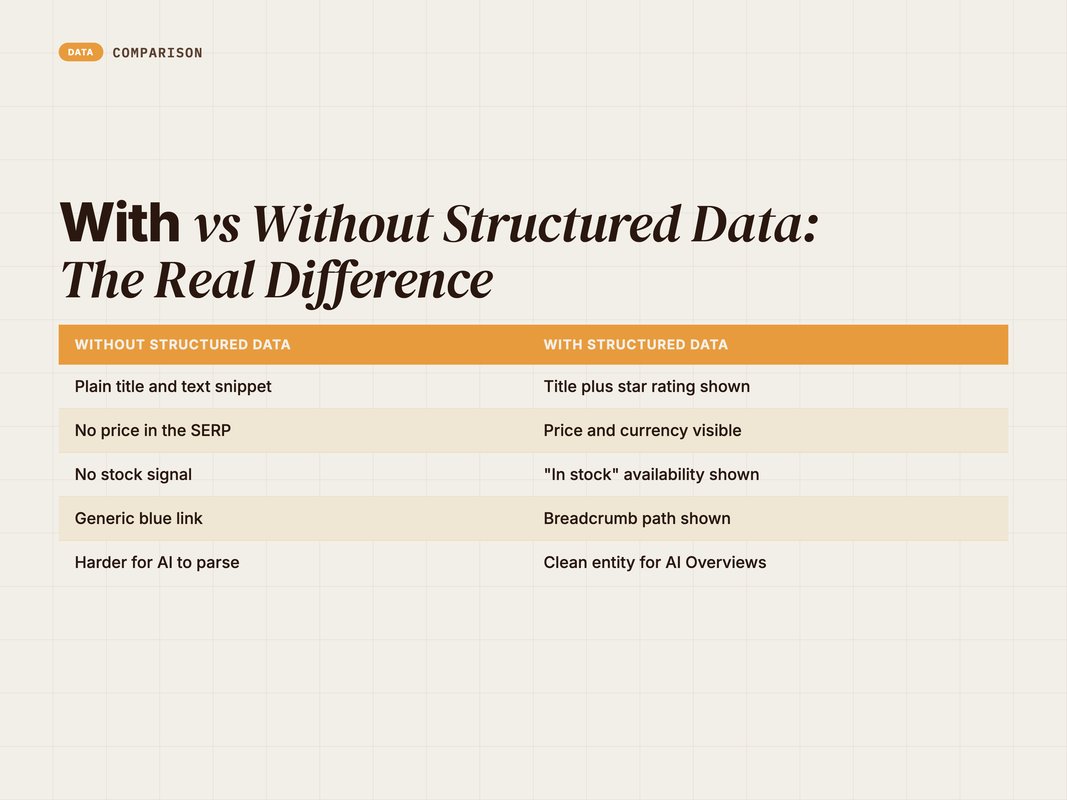
Without structured data, your listing is a blue title and a grey line of text. It competes on copywriting alone.
With it, the same listing can carry a 4.7-star rating, a live price, and an "In stock" tag.
| Without structured data | With structured data |
|---|---|
| Plain title and text snippet | Title plus star rating shown |
| No price in the SERP | Price and currency visible |
| No stock signal | "In stock" availability shown |
| Generic blue link | Breadcrumb path shown |
| Harder for AI to parse | Clean entity for AI Overviews |
That visual gap is measurable. SearchPilot ran a split test adding price and review schema to product pages.
The result was a roughly 20% uplift in organic performance — (Source: SearchPilot, 2023 — searchpilot.com).
Same rank. More clicks. That is the whole game.
Q: Why does structured data lift click-through rate?
A: It makes your result more useful and more visual before the click. Ratings, price, and availability answer buyer questions in the SERP itself. That trust signal pulls clicks away from plainer competing listings.
The Five Schema Types Every Store Needs
You do not need every type schema.org offers. You need five, mapped to the right page.
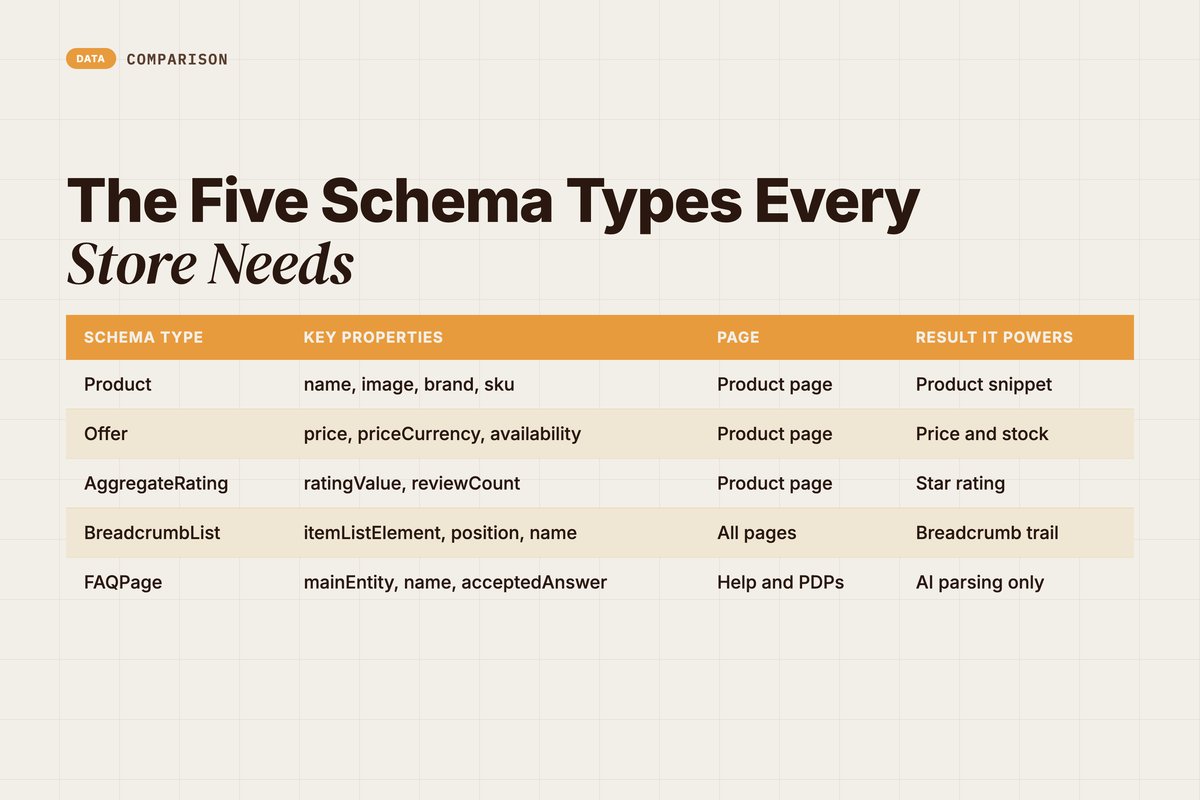
Each type does one job. Product describes the item. Offer prices it. Reviews rate it. Breadcrumbs place it. FAQs answer around it.
| Schema type | Key properties | Page | Result it powers |
|---|---|---|---|
| Product | name, image, brand, sku | Product page | Product snippet |
| Offer | price, priceCurrency, availability | Product page | Price and stock |
| AggregateRating | ratingValue, reviewCount | Product page | Star rating |
| BreadcrumbList | itemListElement, position, name | All pages | Breadcrumb trail |
| FAQPage | mainEntity, name, acceptedAnswer | Help and PDPs | AI parsing only |
A quick note on scope. Google recommends Product, Review, BreadcrumbList, and Organization as the core set for stores — (Source: Google Search Central, 2026 — developers.google.com).
We add Offer because Product needs it to show price. We keep FAQPage as optional, for reasons we cover later.
Organization sits a level up. It describes your brand, not a product.
Mark it up once, sitewide. Add your logo, contact info, and return policy. It builds trust signals that span the whole store.
Match each type to the right page. Product and Offer live on product pages. Breadcrumbs and Organization ship everywhere. That mapping keeps the work clean.
Q: Do I need ProductGroup schema too?
A: Only if you sell variants like sizes or colours under one page. ProductGroup groups those variants for Google. A single-variant product page does not need it. Start with Product, then add ProductGroup if you have variant pages.
Product and Offer Schema (Copy-Paste JSON-LD)
This is the core of schema markup for e-commerce. Get this one block right.
The Product type needs a name. To show a price, it needs a nested offers block — (Source: Google Search Central, 2026 — developers.google.com).
Here is a complete, valid Product with a single Offer. Swap the placeholders for your data.
{
  "@context": "https://schema.org",
  "@type": "Product",
  "name": "[Your Product Name]",
  "image": [
    "https://example.com/photos/product-1x1.jpg",
    "https://example.com/photos/product-4x3.jpg"
  ],
  "description": "[One-paragraph product description.]",
  "sku": "SKU-12345",
  "mpn": "MPN-12345",
  "brand": {
    "@type": "Brand",
    "name": "[Your Brand]"
  },
  "offers": {
    "@type": "Offer",
    "url": "https://example.com/products/your-product",
    "priceCurrency": "USD",
    "price": "49.00",
    "priceValidUntil": "2026-12-31",
    "availability": "https://schema.org/InStock",
    "itemCondition": "https://schema.org/NewCondition"
  }
}
Let's break down the Offer block, since that is where most errors live.
price and priceCurrency are required for a merchant listing — (Source: Google Search Central, 2026 — developers.google.com). The currency is a three-letter ISO 4217 code, like USD or INR.
availability is recommended. It takes a schema.org value such as https://schema.org/InStock or https://schema.org/OutOfStock.
priceValidUntil and itemCondition are also recommended. They keep your snippet fresh and accurate.
A word on the other Product fields. sku, mpn, and brand are not required, but they matter.
They turn a thin Product into a strong one. Google leans on brand and product IDs to match your item across surfaces.
image is required for a merchant listing. Pass more than one. Use a square crop and a wide crop so Google can pick the best fit.
description is recommended too. Keep it real. It should match the copy a shopper reads on the page.
Skip none of these on your top sellers. The richer the Product entity, the more shopping surfaces can use it.
When You Have a Price Range
Some pages list a range, not one price. Think "from $20 to $45" across variants.
Use AggregateOffer instead of Offer. It needs lowPrice and priceCurrency — (Source: Google Search Central, 2026 — developers.google.com).
{
  "@context": "https://schema.org",
  "@type": "Product",
  "name": "[Your Product Name]",
  "offers": {
    "@type": "AggregateOffer",
    "priceCurrency": "USD",
    "lowPrice": "20.00",
    "highPrice": "45.00",
    "offerCount": "6"
  }
}
highPrice and offerCount are recommended here. They make the range render cleanly.
Q: What availability values can I use?
A: Use the schema.org enumerations. Common ones are InStock, OutOfStock, PreOrder, BackOrder, and SoldOut. Write them as full URLs, like https://schema.org/InStock. Google reads these to show or hide the stock tag.
Adding Ratings and Reviews to Product Schema
Stars are the highest-value snippet in e-commerce. They are also the easiest to get wrong.
You can show ratings two ways. A single review, or an aggregateRating that sums all of them.
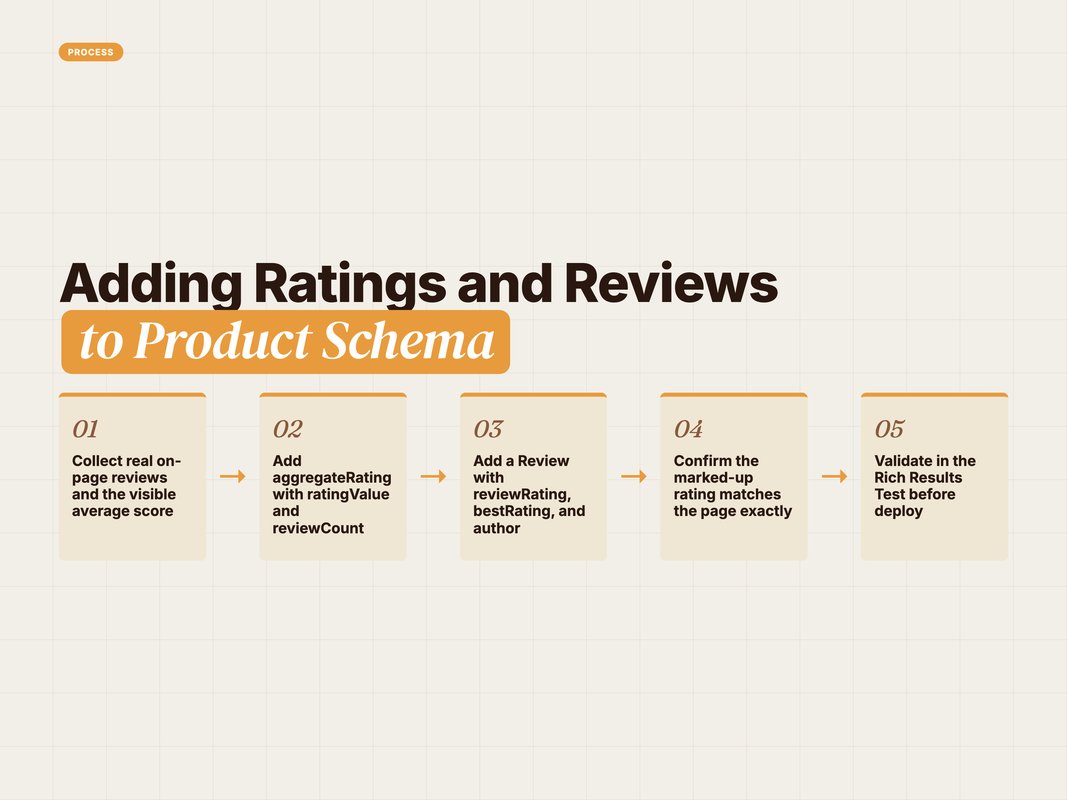
For a store, use aggregateRating. It rolls every review into one score and count.
Here is the Product block extended with both an aggregate rating and one sample review.
{
  "@context": "https://schema.org",
  "@type": "Product",
  "name": "[Your Product Name]",
  "aggregateRating": {
    "@type": "AggregateRating",
    "ratingValue": "4.7",
    "reviewCount": "128"
  },
  "review": {
    "@type": "Review",
    "reviewRating": {
      "@type": "Rating",
      "ratingValue": "5",
      "bestRating": "5"
    },
    "author": {
      "@type": "Person",
      "name": "[Reviewer Name]"
    },
    "reviewBody": "[Short quote from the review.]"
  }
}
A few rules keep this from failing review. The aggregateRating needs ratingValue and reviewCount — (Source: Google Search Central, 2026 — developers.google.com).
The Review needs a reviewRating and an author — (Source: Google Search Central, 2026 — developers.google.com). The rating itself should carry a bestRating so Google knows the scale.
One hard rule. The rating must match what users see on the page.
Marking up reviews that are not visible is a policy breach. It can pull your rich results entirely.
The numbers here are real fuel for clicks. Review structured data is what earns the star icon in search.
That star is the single most eye-catching element a listing can carry. It signals trust before a word is read.
So the order of work is simple. Collect real reviews. Show them on the page. Then mark them up.
Never invent the count. Never round it up. Google's spam systems and manual reviewers both check.
If you use a reviews app, confirm it outputs schema. Many do. If it does, do not also hand-code a second block, or you will double up.
Q: Can I make up ratings to get stars?
A: No. The marked-up rating must reflect real reviews shown on the same page. Fabricated or hidden ratings break Google's review snippet policy. That risks a manual action and loss of all rich results for the site.
Breadcrumb Schema for Site Hierarchy
Breadcrumbs are the quietest win on this list. They cost little and ship sitewide.
They tell Google your store's structure. Home, then category, then product.
BreadcrumbList holds an itemListElement array. Each entry is a ListItem with a position, a name, and an item URL — (Source: Google Search Central, 2026 — developers.google.com).
{
  "@context": "https://schema.org",
  "@type": "BreadcrumbList",
  "itemListElement": [
    {
      "@type": "ListItem",
      "position": 1,
      "name": "Home",
      "item": "https://example.com"
    },
    {
      "@type": "ListItem",
      "position": 2,
      "name": "Running Shoes",
      "item": "https://example.com/running-shoes"
    },
    {
      "@type": "ListItem",
      "position": 3,
      "name": "[Your Product Name]"
    }
  ]
}
Notice the last item. It has no item URL.
That is intentional. For the final breadcrumb, Google uses the current page, so the URL is optional — (Source: Google Search Central, 2026 — developers.google.com).
Template this once against your category tree. It then renders on every page for free.
There is a second reason breadcrumbs earn their place. They map your site for the crawler.
A clear hierarchy helps Google group related pages. Category, sub-category, product. The path tells a story.
Match the schema to your visible breadcrumb trail. They should say the same thing. A mismatch confuses the crawler and risks an error in Search Console.
Keep the position integers in order, starting at one. Skipping or repeating a number is a common, avoidable bug.
Q: Where does breadcrumb schema show up?
A: It replaces the raw URL in your search result with a readable path. Instead of a long link, the searcher sees Home > Running Shoes. It signals relevance and tidies up your listing across the whole site.
Is FAQ Markup Still Worth It in 2026?
Here is the honest answer most guides skip. FAQ rich results are gone.
Google deprecated the FAQ rich result in May 2026 — (Source: Google Search Central, 2026 — developers.google.com). The expandable FAQ snippet no longer shows in Search.
So why include it at all? Because the markup is still valid schema.org.
AI systems and assistants can parse a clean FAQPage block. It structures your answers for machines, even without the SERP feature.
{
  "@context": "https://schema.org",
  "@type": "FAQPage",
  "mainEntity": [
    {
      "@type": "Question",
      "name": "What is your return window?",
      "acceptedAnswer": {
        "@type": "Answer",
        "text": "[Your return policy, in one or two sentences.]"
      }
    },
    {
      "@type": "Question",
      "name": "Do you ship internationally?",
      "acceptedAnswer": {
        "@type": "Answer",
        "text": "[Your shipping coverage, stated plainly.]"
      }
    }
  ]
}
The structure is simple. mainEntity holds an array of Question objects.
Each Question needs a name and an acceptedAnswer. The answer needs a text value.
Our take? Keep FAQ markup on policy and help pages. Drop it from product pages if it slows your build. The SERP payoff is no longer there.
Q: Should I remove FAQ schema I already have?
A: No need to rush. It is still valid and harmless. It can aid AI parsing. Just stop expecting the FAQ rich result, and do not spend new effort scaling it across product pages.
Where to Place the Code and How to Validate
Good markup in the wrong place still fails. Placement and testing close the loop.
Use JSON-LD. It is Google's recommended format and stays separate from your HTML — (Source: Google Search Central, 2026 — developers.google.com).
Drop each block inside a <script type="application/ld+json"> tag. Place it in the page <head> or <body>. Both work for Google.
Run this checklist before every deploy.
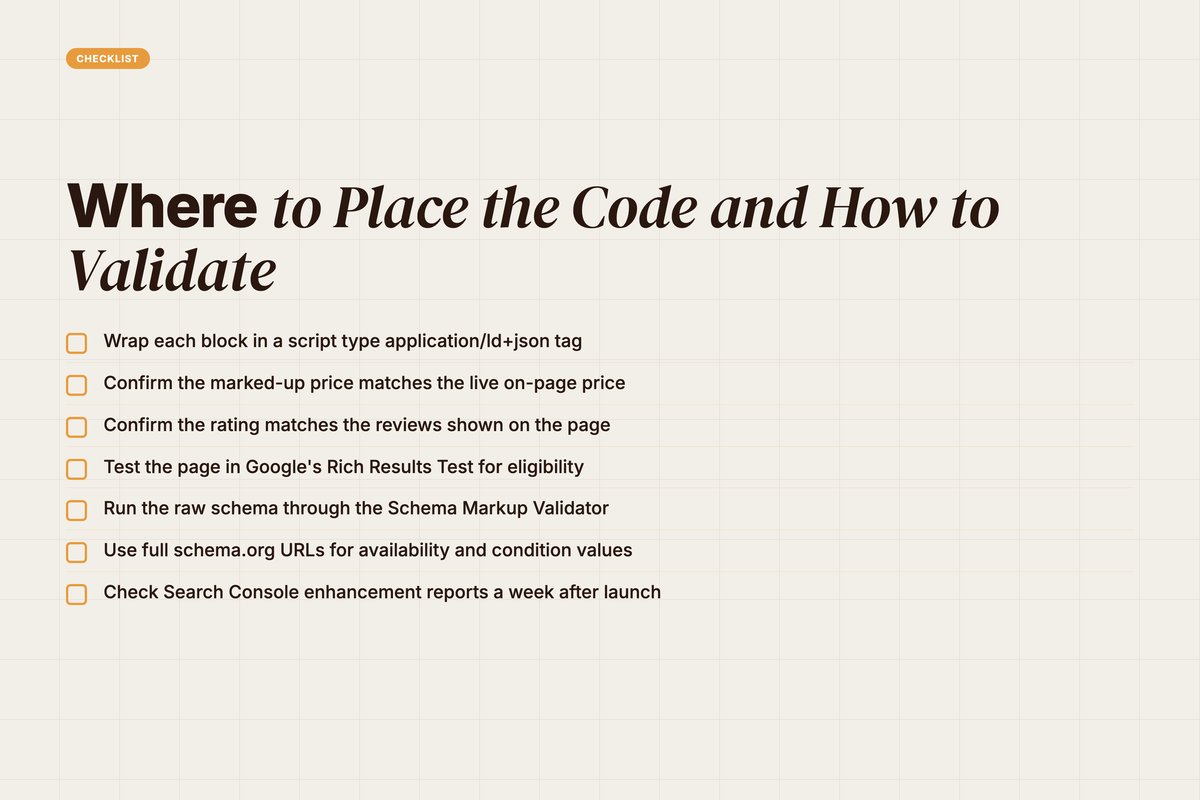
- Wrap each block in a script type application/ld+json tag.
- Confirm the marked-up price matches the live on-page price.
- Confirm the rating matches the reviews shown on the page.
- Test the page in Google's Rich Results Test for eligibility.
- Run the raw schema through the Schema Markup Validator.
- Use full schema.org URLs for availability and condition values.
- Check Search Console enhancement reports a week after launch.
Two tools do the heavy lifting. The Rich Results Test checks if your page qualifies for rich results.
The Schema Markup Validator checks raw schema.org syntax. Use both, in that order.
Read each tool's output in full. A green pass is not the end.
Both tools flag warnings, not just errors. A warning often means a recommended field is missing. Fill the gaps to get the richest result.
After launch, watch Search Console. Its enhancement reports flag live errors on real URLs, which a one-off test cannot.
One more placement note. Render the JSON-LD server-side where you can.
Google can read script injected by JavaScript. But server-rendered markup is safer and faster to crawl. It removes a class of timing bugs.
Avoid a few common traps. Do not mark up data that is not on the page. Do not let a stale price linger in the schema after a sale ends.
Keep the markup in sync with the live page at all times. A drifted price is both a policy risk and a bad shopper experience.
Treat validation as a release gate, not a one-off. Schema breaks quietly when templates change. A monthly check catches the drift early.
Q: Head or body for JSON-LD?
A: Either works for Google. Many teams inject it in the head via their template or tag manager. The key is that it renders in the final HTML the crawler sees, not only after a delayed script.
How We Roll Schema Out at Scale
Hand-coding schema per product does not scale past a few SKUs. The fix is templating.
At YARD, we treat structured data as a system, not a task. We build one JSON-LD template per page type, then map it to live fields.
The Product template pulls name, price, currency, and stock from your catalogue. The breadcrumb template reads your category tree. Nothing is typed twice.
We wire validation into the pipeline. Every template run gets checked against the Rich Results Test logic before it ships.
This is part of how our LLM SEO work earns AI Overview citations and rich snippets for D2C and B2B stores. Clean entities in, richer results out.
We pair it with the rest of the technical SEO stack. Site structure, internal linking, and Core Web Vitals all feed the same goal.
The result is a store Google understands at the property level. That is the foundation rankings and rich results are built on.
The same system feeds Merchant Center. One Product template, two destinations.
You mark up the catalogue once. Search reads it for rich results. Shopping reads it for listings. The data stays in one place.
This is the real unlock at scale. Schema stops being a chore per page. It becomes a property of your platform.
If your catalogue has grown past what you can mark up by hand, that is the signal to systematise it. Our wider technical SEO work picks up from there. [internal link: technical-seo-for-ecommerce].
Conclusion: Make Your Store Readable
Schema markup for e-commerce is not a nice-to-have. It is how you get understood.
The work is finite. Five types, a handful of required properties, two validation tools.
Start with Product and Offer on your top sellers. Add ratings where you have real reviews. Ship breadcrumbs sitewide.
Validate every block before launch. Then watch Search Console for live errors.
The payoff is concrete. Richer snippets, higher click-through, and clean entities your AI-era buyers can find.
Want a structured-data audit of your store, templated and validated end to end? That is the kind of build we run every week. [internal link: contact-yard].
FAQ
Q: What is schema markup for e-commerce?
A: Schema markup for e-commerce is structured data you add to product and category pages. It tells search engines the price, stock status, ratings, and brand of each product. Google reads it to build rich results and to feed AI Overviews and Merchant Center.
Q: Which schema types do e-commerce sites need?
A: Most stores need five types. Product with a nested Offer for product pages. AggregateRating or Review for star ratings. BreadcrumbList for navigation. Organization for brand-level trust signals. FAQPage is optional, since Google no longer shows FAQ rich results.
Q: What format should I use for product schema?
A: Use JSON-LD. It is the format Google recommends for all structured data. You add it as a single script block in the page head or body. It stays separate from your visible HTML, so it is easy to template and maintain.
Q: Does schema markup improve rankings?
A: Schema is not a direct ranking factor. It earns rich results like star ratings and price, which lift click-through rate. SearchPilot measured a roughly 20% organic uplift from adding price and review schema to product pages. More clicks can lift rankings over time.
Q: How do I test my e-commerce structured data?
A: Use Google's Rich Results Test to confirm eligibility for rich results. Use the Schema Markup Validator for raw schema.org syntax. Then watch the Search Console enhancement reports for live errors after deployment.
Q: Will FAQ schema still get me rich results?
A: No. Google deprecated FAQ rich results in May 2026. The FAQPage markup is still valid schema.org and can help AI systems parse your content. But it will not show the expandable FAQ snippet in search anymore.
Insights from Our Experts
Explore our latest articles on digital marketing strategies.